
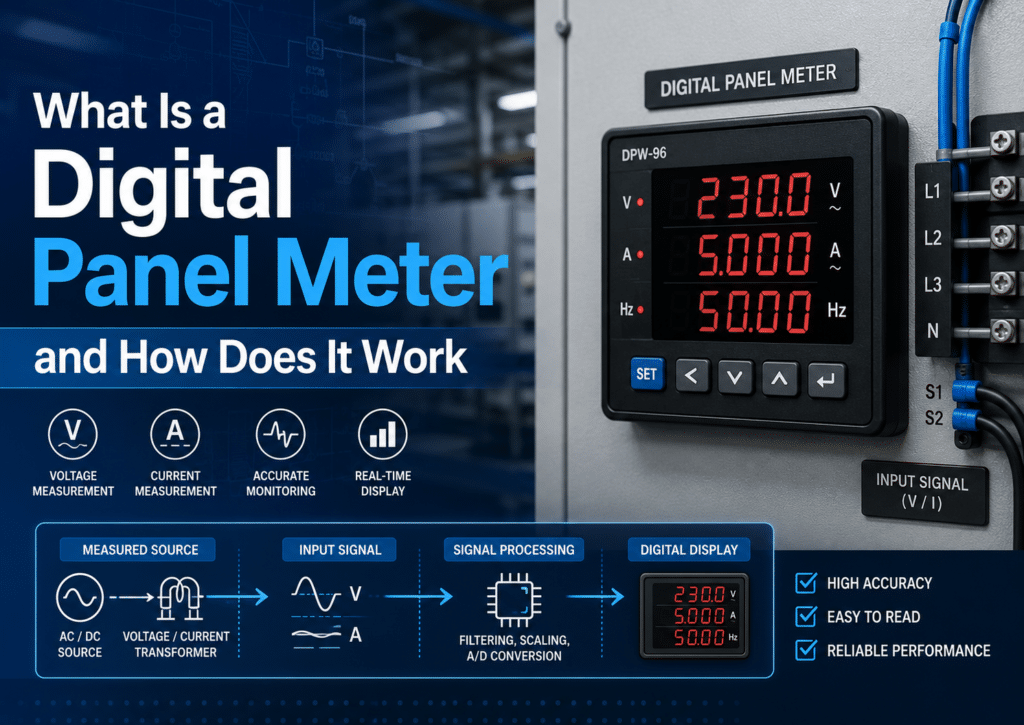
A digital panel meter is a panel-mounted instrument that converts electrical inputs—voltages, currents, or pulse signals—into a numeric digital readout using an ADC chip. It picks up a signal from a sensor or circuit, processes it, and displays the value on a 3.5- or 4.5-digit screen. These meters read to approximately 0.1%[1] accuracy, compared to 2-3% for analog dials, and mount into standard DIN cutouts like 96×48 mm. Basic units start near $15, while programmable process meters exceed approximately $200.
Which parts go into making one? How does it differ from an analog meter? Which specifications matter most when you are choosing one? And how much should you generally expect to pay for it?
Quick Takeaways
- Choose ADC-based digital panel meters for approximately 0.1% accuracy over analog’s 2-3% error.
- Match meter cutouts to DIN standards like 96×48 mm[2] or 48×24 mm.
- Budget approximately $15 for basic units; expect $200+ for programmable process meters.
- Confirm input type—voltage, current, or pulse—before selecting your panel meter.
- Pick 3.5- or 4.5-digit displays based on required reading resolution.
What Is a Digital Panel Meter?
A digital panel meter is a panel-mounted instrument that converts an electrical input into a numeric digital readout. Essentially, it picks up a signal from a sensor or a circuit, works through it, and then shows you the value as clear digits on a screen. You mount it through a square or rectangular hole cut into a control panel, so the operators can read a number with a quick glance.
Most of these units will display the common process variables you’d expect, things like voltage, current, temperature, pressure, and weight. Some of them also show frequency or resistance. The idea behind it is really simple. You take a raw signal and turn it into a number that a person can actually act on, without having to guess where some needle happens to be pointing.
How is a digital panel meter different from a transmitter, controller, or multimeter?
The difference basically comes down to the job each one does. A panel meter displays a value at one fixed spot. The other three move signals around, convert them, or act on them instead.
- Transmitter: This one converts a sensor signal into a standard output, like the common 4–20 mA range, and sends it somewhere else. It doesn’t actually show you a number, it just transmits one along.
- Controller: A controller reads an input, compares it against a setpoint, and then adjusts an output, which could be a valve, a heater, or a motor, to hold a target value. A panel meter, on the other hand, only watches what is happening.
- Multimeter: This is a handheld test tool that you carry around with you. A panel meter stays bolted in one place for permanent, continuous monitoring of the readings.
The line between them does blur a bit, though. Many of the modern meters now add alarm relays and simple control functions that trigger at a preset value. Here is a practical tip to keep in mind. If you need to log readings or close a loop, confirm that the meter actually has relay outputs or RS-485 communication before you buy it, because the display-only models simply don’t.
What Are the Main Components of a Digital Panel Meter?
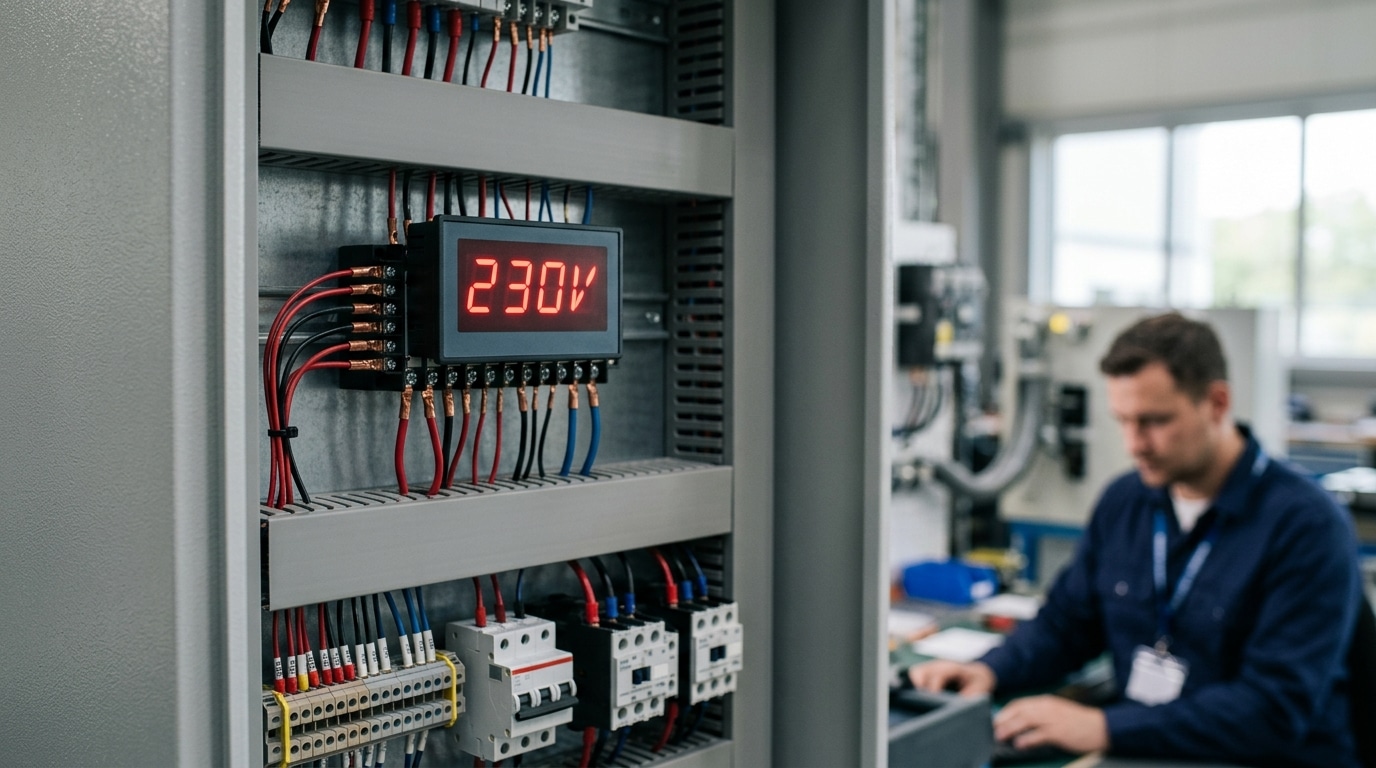
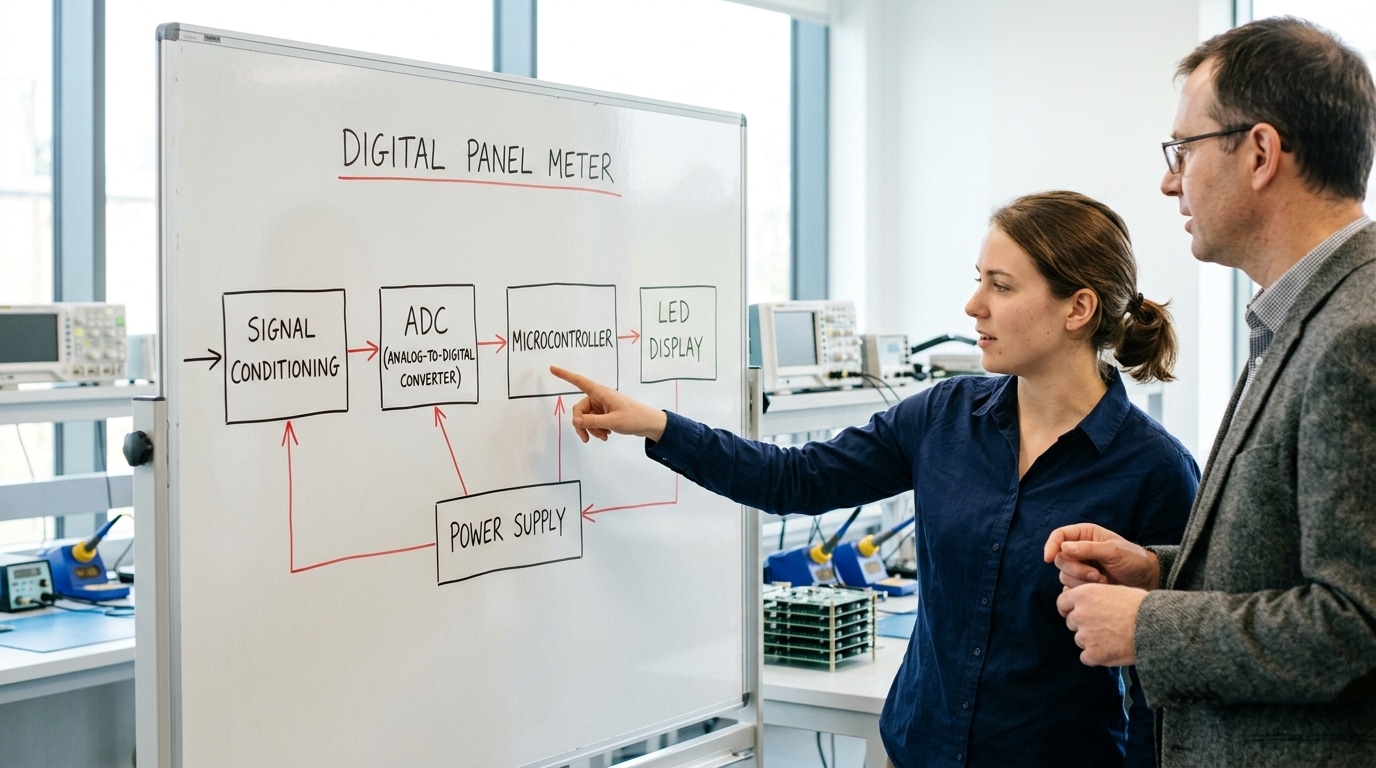
A digital panel meter has five core blocks: an input/signal-conditioning stage, an analog-to-digital converter (ADC), a microcontroller, a display, and a power supply. The signal flows through them in that order. Each block maps directly to a line on the spec sheet, so knowing them tells you exactly what you’re paying for.
What does the input and signal-conditioning stage do?
The input stage takes the raw signal, say, a 0,10V sensor output or a thermocouple’s tiny millivolt signal, and scales, filters, and protects it. A thermocouple may put out only 40 microvolts per °C, so this stage amplifies weak signals before they reach the ADC. It also blocks voltage spikes that would otherwise fry the chip downstream.
How do the ADC and microcontroller turn signals into numbers?
The ADC samples the conditioned analog signal and converts it to a digital value. Resolution matters here: a 16-bit ADC splits the input range into 65,536 steps, far finer than a 12-bit unit’s 4,096 steps. The microcontroller then linearizes, scales, and compares that value, many digital panel meters can compare inputs with set values and send data to PLCs, which is how alarms and relay outputs work.
LED or LCD — which display should you pick?
| Feature | LED | LCD |
|---|---|---|
| Outdoor/bright readability | Excellent | Poor without backlight |
| Power draw | Higher | Lower |
| Best use | Factory floors | Battery-powered panels |
The power supply ties it together, often accepting 85,264VAC or a 9,32VDC range so one part fits multiple installations.
How Does a Digital Panel Meter Work Step by Step?
A digital panel meter does its job by passing a signal through five stages, which are sensing, scaling, analog-to-digital conversion, microcontroller math, and display refresh. The entire journey happens in just a few thousandths of a second. Omron’s 2026 overview explains it as digitally working through voltages, currents, and pulse signals, taking a raw electrical value and turning it into a tidy number that you can read in a single glance.
Here is the path the signal travels, followed from start to finish:
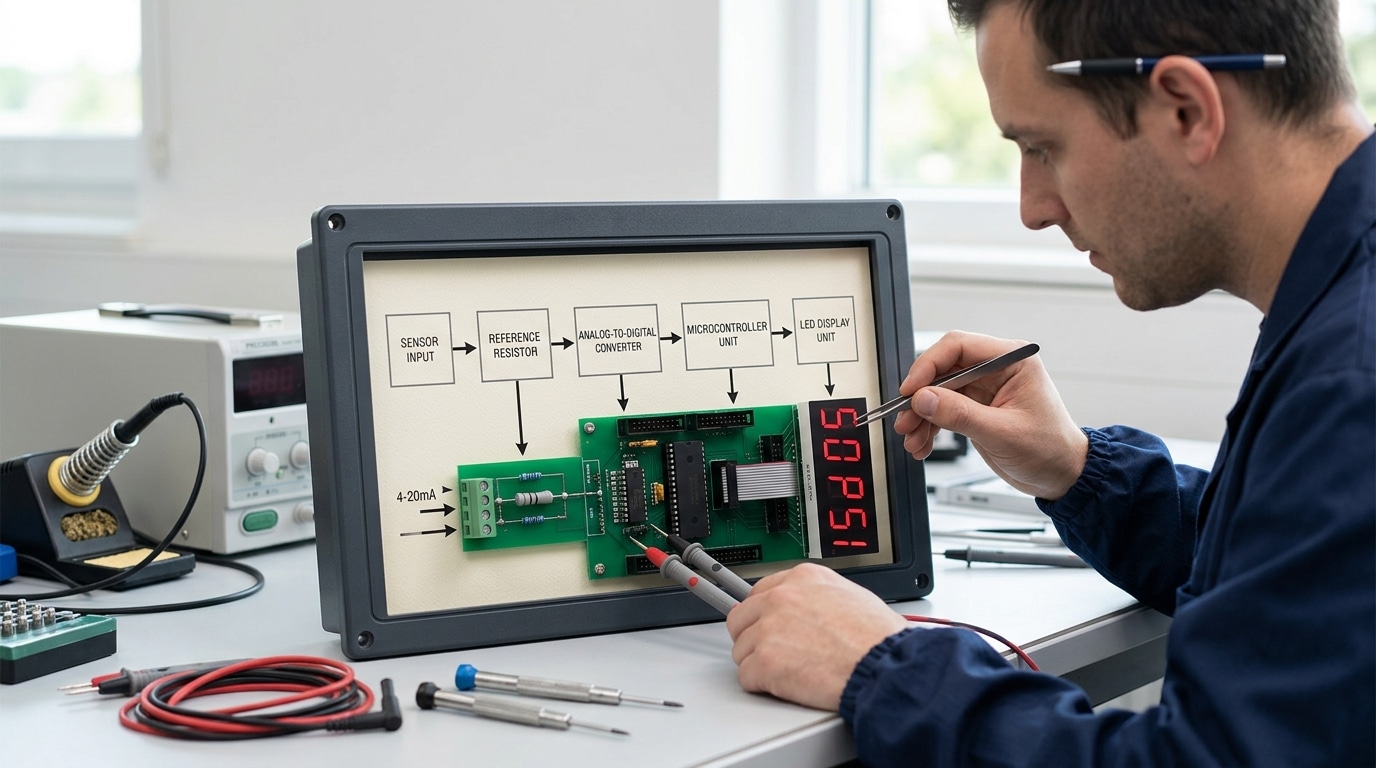
- Sensing: A sensor or a wire delivers the raw input, for example a 4-20mA current loop coming from a pressure transmitter, which is a device that turns physical pressure into an electrical signal.
- Scaling/attenuation: The input stage knocks down high voltages or sends the current across a precision resistor, which is a very accurate fixed component. A 20mA signal passing through a 250-ohm resistor turns into a clean 5-volt signal.
- Analog-to-digital conversion (ADC): The ADC takes samples of that voltage and converts it into a binary count, which is just a number the chip can work with. A 16-bit ADC divides the range into 65,536 separate steps, so each individual count represents a very small amount.
- Microcontroller calculation: The chip applies the scaling formula you set, straightens out the signal so it tracks evenly, and filters out electrical noise.
- Display refresh: The finished value lights up the LED or LCD screen, refreshing somewhere between 2 and 20 times every second.
How does a 4-20mA loop become an engineering-unit readout?
The meter takes the 4-20mA range and matches it to the actual units you care about in the real world. Imagine your transmitter measures from 0 to 100 PSI. You would program it so that 4mA equals 0 PSI and 20mA equals 100 PSI. When the loop is carrying 12mA, which sits exactly in the middle, the microcontroller works out 50 PSI and puts that on the screen. This is the reason that understanding what a digital panel meter is really comes down to understanding scaling, because the meter never actually “knows” the pressure. Instead, it just does math on the current.
Pro tip: always start your offset from 4mA rather than from zero. That 4mA floor gives the meter a way to spot a broken wire, since a genuine 0mA reading then points to a fault instead of a real measurement.
What Input Signals and Types of Digital Panel Meters Exist?
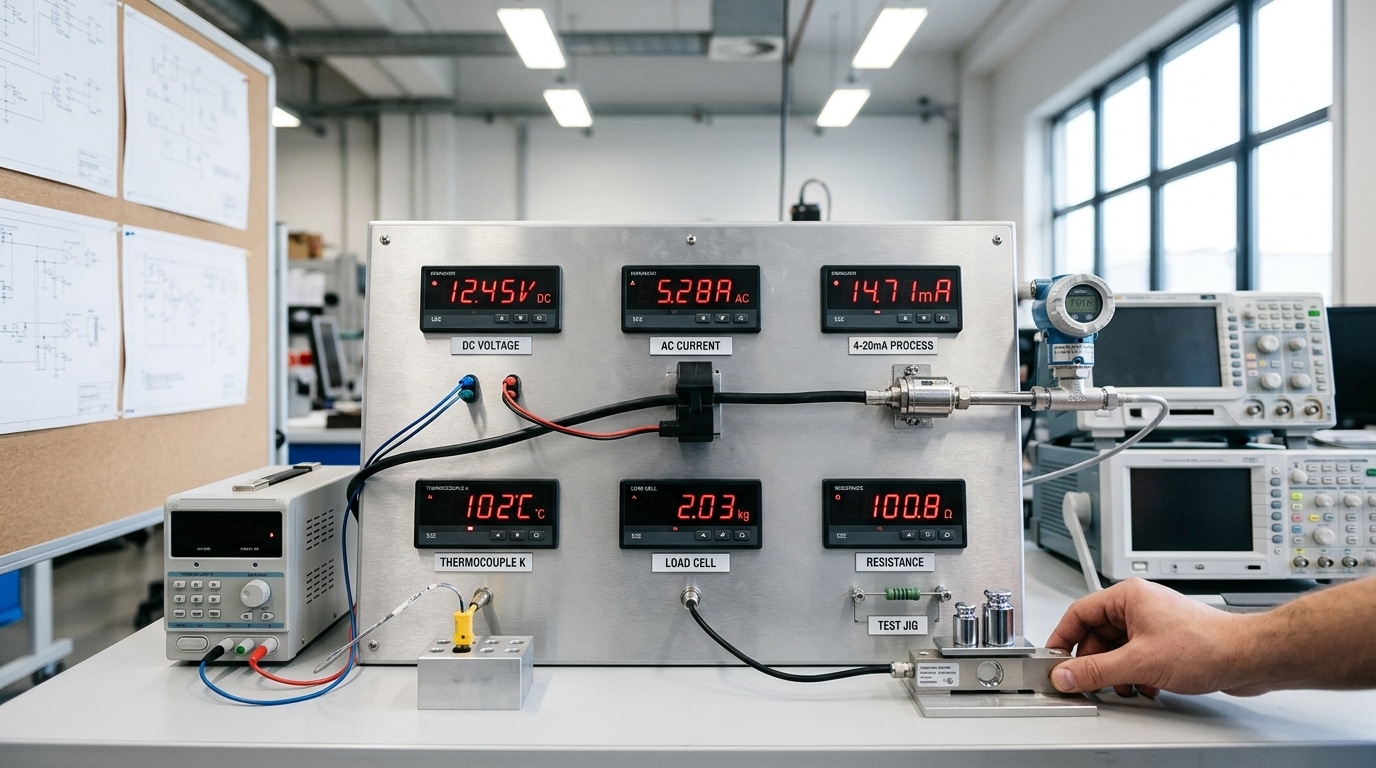
Digital panel meters get sorted by the kind of signal they take in. The main categories are DC voltage/current meters, AC meters, process meters (4-20mA, 0-10V[4]), temperature meters (thermocouple/RTD), load cell/strain gauge meters, and resistance meters. A lot of modern units actually handle several of these inputs at once, including DC voltage, current, thermocouples, RTDs, load cells, and pulse signals (2026).
The signal type tells you which sensor gets connected and what range you should expect to see. You have to match them correctly, because if you don’t, the reading starts to drift away from what it should be.
- DC voltage/current meters: These read direct-current signals, generally 0-200mV, 0-10V, or 4-20mA. They work alongside shunts, which are precision resistors that turn a large current into a small voltage, and they pair with battery or solar systems.
- AC meters: These display alternating voltage, current, and frequency (50/60Hz). They connect to current transformers (CTs) sitting on the power lines.
- Process meters: These accept the industry-standard 4-20mA or 0-10V loops coming from transmitters that measure pressure, flow, or level. The 4mA “live zero” is what lets the meter notice when a wire has broken.
- Temperature meters: These read thermocouples (Type K, J, T) or RTDs (Pt100, which is a platinum sensor that reaches 100 ohms at 0°C). Type K thermocouples cover a range of roughly -200°C[5] to 1260°C.
- Load cell/strain gauge meters: These measure the tiny millivolt-per-volt signals that come from weighing sensors, typically around 2-3mV/V.
- Resistance/ohm meters: These display resistance directly for position sensors or potentiometers.
One practical tip is that a thermocouple meter really needs cold-junction compensation built in, otherwise your reading will shift around with the room temperature. It’s best to skip any meter that lacks this feature if you’re doing thermocouple work. And if you’re still wondering, What Is a Digital Panel Meter? at its core, it’s simply the device that turns these various signals into a readable number on a display.
How Do I Decode a Digital Panel Meter Spec Sheet to Choose the Right One?
Match the spec sheet to your measurement job by checking six lines in order: input type, accuracy, resolution, display, scaling, and isolation. Get the input range right first,a meter rated for thermocouples can’t read a 4,20 mA loop. A digital panel meter that fits 80% of the spec but misses the input type is the wrong meter.
What accuracy number actually matters?
Read accuracy as “% of reading” plus a digit count, not “% of span”. A spec of ±0.05% of reading ±1 digit beats ±0.1% of full scale when your signal sits low in the range.
On a 10 V[6] span reading 2 V, span-based error swallows the small value. Process-grade meters from major suppliers commonly hit ±0.1% accuracy, as documented in Omron’s panel meter overview.
How do resolution and display height affect the choice?
| Spec | What it means | Pick when |
|---|---|---|
| 3½ digits | Counts to 1999 | Simple voltage/current |
| 4½ digits | Counts to 19999 | Fine process control |
| Digit height 14.2 mm | Readable to ~5 m | Standard panels |
| Digit height 57 mm | Readable to ~20 m | Factory floor displays |
Two final checks close the deal. Confirm scaling and excitation: the meter must source sensor power (like 10 V[7] for a load cell) and let you scale raw counts to engineering units. Then verify galvanic isolation,1500 V input-to-supply isolation stops ground loops from corrupting readings or damaging the unit. Skip isolation on noisy industrial gear and you’ll chase phantom errors for weeks.
What Are Standard DIN Panel Cutout Sizes and Wiring Basics?
Standard DIN panel cutouts follow fixed bezel sizes, with 1/8 DIN (96×48mm) and 1/16 DIN (48×24mm) among the most common. DIN is a German standards body (Deutsches Institut für Normung) whose sizes set the panel hole, so a digital panel meter from one brand drops into the same opening as another. Get the cutout exact and the meter mounts in minutes.
What cutout size and depth do I need to cut?
Cut the hole to the meter’s panel cutout spec, not the bezel size, the bezel overlaps the panel face. The 1/4 DIN and 1/8 DIN sizes are defined by the IEC 61554 standard for panel-mounted devices.
| DIN size | Bezel (mm) | Panel cutout (mm) |
|---|---|---|
| 1/4 DIN | 96×96 | 92×92 |
| 1/8 DIN | 96×48 | 92×45 |
| 1/16 DIN | 48×48 | 45×45 |
| 1/32 DIN | 48×24 | 45×22 |
Mounting depth behind the panel runs 60,120mm, so leave clearance for terminals and cable bends. A rubber gasket between bezel and panel gives the front face an IP65 rating (dust-tight, washdown-safe) under the IP code. Skip the gasket and water seeps in around the bezel.
How do I wire the terminals correctly?
Wire four groups: power input, signal input terminals, sensor excitation, and grounding. For thermocouples, observe polarity and use matching extension wire. Run signal cable separate from power lines, keep at least 50mm[8] spacing to cut noise pickup. Tie the shield ground at one end only to stop ground loops.
Digital vs Analog Panel Meters — Which One Should You Use?
Use a digital panel meter when you need precise readings and remote output to a PLC, but keep an analog meter for trend-watching and high-vibration spots. Analog meters can display inputs as a moving needle that shows direction of change at a glance, something digits can’t match.
Here is the counterintuitive part. A digital readout flashing “47.3… 51.8… 44.1” tells you almost nothing about whether pressure is climbing or settling.
A needle does. That’s why operators on rotating machinery still trust analog dials.
Where does analog still beat digital?
Analog wins on trend-watching and shock resistance. A needle gauge reacts instantly to a rising signal, so you read the slope, not just the number. On pumps or compressors that vibrate hard, digital displays can blur or strobe, while a damped needle holds steady. Analog also needs no power for many basic types.
How do the two compare side by side?
| Factor | Digital Panel Meter | Analog Panel Meter |
|---|---|---|
| Typical accuracy | ±0.1% of reading | ±2% of full scale |
| Readability | Exact number | Trend / slope at a glance |
| Vibration tolerance | Can blur or strobe | Damped needle stays readable |
| Remote output | RS-485, 4–20mA, relay alarms | None |
| Cost (4-digit unit) | $40–$150 | $15–$40 |
| Best fit | Logging, SCADA, precise setpoints | Vibration, fast visual trend checks |
Pick digital when you log data or trip alarms at a setpoint. Pick analog for a vibrating skid where a tech reads the gauge in two seconds.
What Are Digital Panel Meters Used For and What Are Common Selection Mistakes?
Digital panel meters are used to monitor four common process signals: motor current, tank level, weight, and temperature. Each job maps to a specific meter input type. Industry catalogs confirm that panel meters support temperature, load cell, voltage, current, pulse, and frequency inputs (2026). Match the signal to the meter, and you avoid most buying errors.
What real jobs do digital panel meters do?
The application decides the input type. Below are four field-proven pairings.
| Application | Signal source | Meter input type |
|---|---|---|
| Motor current monitoring | Current transformer (CT) | AC current (5A or via CT ratio) |
| Tank level | Pressure or ultrasonic sensor | 4–20mA process input |
| Hopper or scale weight | Load cell (strain gauge) | mV bridge input (2–3mV/V) |
| Oven or motor temperature | Thermocouple or RTD | Type K / Pt100 input |
A 4,20mA loop is the workhorse here. The 4mA floor proves the wire is intact,a true zero (0mA) signals a broken cable, not an empty tank.
What buying mistakes cost you the most?
Skipping input isolation tops the list. Without galvanic isolation (a barrier that blocks stray current paths), a grounded sensor and a grounded PLC create a ground loop that corrupts readings. For load cells and thermocouples, demand 1500V[9] isolation minimum.
- Mismatched input range: A 0–10V meter on a 4–20mA loop reads garbage. Confirm the signal type before ordering.
- Wrong cutout size: A 96×48mm meter won’t fit a 1/16 DIN hole. Verify the panel opening first.
- Over-spec’ing accuracy: Paying for ±0.01% when your sensor is only ±0.5% wastes money—the sensor caps the system.
The accuracy trap stings most. A digital panel meter can’t read more precisely than its weakest sensor allows.
Frequently Asked Questions About Digital Panel Meters
Short answers to the questions buyers ask most before they wire one in.
How do I tell if I already have a digital panel meter?
Look at the readout. If it shows numbers on a glowing screen (LED or LCD) instead of a needle sweeping across a printed scale, you’ve a digital panel meter. The clincher is the back: a digital unit has terminal blocks for a power supply (often 85,265 VAC or low-voltage DC), plus signal and sometimes relay terminals. An analog meter has only two input terminals and no separate power feed.
Can you explain how a panel meter works in one paragraph?
A panel meter takes an electrical input, scales it, converts it to digits, and shows the result on a screen. As Omron’s instrumentation guide puts it, a digital panel meter digitally processes and displays voltages, currents, and other analog or pulse signals, and many models also compare the reading to a set value and send data to a PLC.
What are panel meters actually used for?
They turn a raw sensor signal into a readable process value, temperature, pressure, flow, level, voltage, or current, right on the equipment face. Many add alarm relays that trip when a reading crosses a preset limit, so an operator sees a problem before it becomes downtime.
How do brands like Omega, ProSense, and Precision Digital differ?
All three answer “What Is a Digital Panel Meter?” with similar hardware, but they target different budgets and depth. The table below compares typical positioning.
| Brand | Typical strength | Best fit |
|---|---|---|
| ProSense | Low cost, basic process display | Tight-budget OEM panels |
| Omega/Omron | Wide input range, PLC data output | Mixed-signal labs |
| Precision Digital | NEMA 4X loop-powered models | Wet, hazardous areas |
Choosing Your Digital Panel Meter — Key Takeaways and Next Steps
Pick the right digital panel meter by running four checks in order: define the input signal, set your accuracy budget, confirm the panel cutout, then verify isolation and output. A digital panel meter is a panel-mounted instrument that digitally processes and displays voltages, currents, and other signals, so a wrong input choice breaks everything downstream. Get these four right and the rest is wiring.
What checklist should I run before buying?
Work through this order. Skipping a step is how returns happen.
- Define input first: thermocouple, RTD, 4–20mA, 0–10V[10], or pulse. The sensor decides the meter, not the other way around.
- Set accuracy need: a ±0.1% meter and a ±1% meter can cost very different amounts. Don’t pay for 0.1% if your process tolerance is 2°C.
- Confirm cutout: measure your existing hole. A 1/8 DIN (96×48mm) meter won’t fit a 1/16 DIN opening.
- Check isolation and output: confirm input-to-output isolation in volts, plus any relay, retransmission, or Modbus output you need for a PLC link.
How do I verify compatibility before purchase?
Request the full datasheet, not the marketing page. The datasheet lists input ranges, supply voltage, isolation rating, and cutout dimensions in one place.
Compare the datasheet against your wiring diagram line by line. Confirm the supply voltage matches your panel (24VDC vs 230VAC is a common mismatch). Many meters can also trigger alarms at a preset value, so verify the relay contact rating handles your load before you trust it to switch a pump.
Buy one sample, bench-test it, then order the batch.
Panel Monitoring Components
SENTOP Digital Panel Meters for Voltage, Current and Power Monitoring
Need panel meters for distribution cabinets, control panels, generators, machinery, or power monitoring systems? SENTOP supplies practical digital panel meters for AC/DC voltage, current, and multi-function electrical measurement.
- ✓AC and DC voltage/current meters
- ✓Single-phase and three-phase options
- ✓LED/LCD display models available
- ✓Bulk supply for panel builders and distributors
Compare models and request a quotation
Reference Sources
- [1]ia.omron.com/support/guide/62/overview.html — supports: A digital panel meter is a panel-mounted instrument that digitally processes and display…
- [2]sunapecopower.com/what-is-a-digital-panel-meter-and-how-it-works/ — supports: Digital panel meters are commonly used to show voltage, current, frequency, and resistan…
- [3]metravi.com/what-are-digital-panel-meters/ — supports: Many digital panel meters are mounted in control panels and convert sensor inputs into d…
- [4]laurels.com/digital-panel-meter — supports: Digital panel meters often support inputs such as DC voltage, current, thermocouples, RT…
- [5]automationdirect.com/adc/overview/catalog/process_control_-a-_measurement/dig… — supports: AutomationDirect lists digital panel meters as supporting process signals including temp…
- [6]dwyeromega.com/en-us/resources/panel-meters — supports: DwyerOmega describes panel meters as instruments that can display inputs in digital or a…
- [7]ia.omron.com — supports: Manufacturer explanation of digital panel meter functions, including signal processing, …
- [8]automationdirect.com — supports: Industrial catalog source covering common digital panel meter inputs, mounting formats, …
- [9]dwyeromega.com — supports: Instrumentation reference describing panel meter types, inputs, alarms, and computer con…
- [10]laurels.com — supports: Technical product explanation of digital panel meter input types and internal signal-con…

Discover more from SENTOP Electrical Co., Ltd
Subscribe to get the latest posts sent to your email.
