
Choose the circuit job
Decide whether the terminal only passes a circuit through, shares a potential, connects PE, holds a fuse, supports testing, or groups device wiring.

The most useful terminal block type is the one that matches the circuit job first. Start with feed-through, distribution, protective earth, fuse, disconnect, or another required function. Then choose the connection technology, mounting method, conductor range, ratings, accessories, and product evidence. A block can be “push-in,” “DIN rail,” and “fused” at the same time because those words describe different features.

Product lists often mix three questions. “Fuse” describes a circuit function. “Push-in” describes how the wire is held. “DIN rail” describes how the product is mounted. These are not competing answers. One product may use all three descriptions.
This guide treats the ten entries below as practical buying families. The first seven are mainly organized by circuit job. The last three are common physical or equipment interfaces that buyers search for as product families. They are useful categories, but they are not mutually exclusive.
A “push-in DIN-rail fuse terminal block” uses a push-in spring to hold the conductor, clips to a rail, and holds a fuse for a defined circuit. Removing any one of those words changes only part of the product description.
Decide whether the terminal only passes a circuit through, shares a potential, connects PE, holds a fuse, supports testing, or groups device wiring.
Confirm voltage, current, conductor, temperature, spacing, dimensions, accessories, instructions, and certification scope for the exact model.
This small change makes long catalogues easier to compare. It also prevents a fast connection method or familiar housing style from hiding the circuit function you actually need.
This is the first filter. The electrical drawing should make the job clear.
The technology changes preparation, tools, production work, inspection, and service method.
The interface affects panel space, PCB design, replacement, wiring direction, and accessories.
Use the “best fit” line to make a shortlist. Use the “verify” line to decide whether a real model can stay on that shortlist. No generic current, voltage, wire-size, or torque number applies to an entire type.
A feed-through block joins two terminal points through one conductive path. It creates an organized transition for a power, control, or signal circuit.
A PE block connects a protective conductor to an approved grounding path. Color or a metal foot alone does not prove this function. The exact product must be evaluated as PE.
A fuse block combines a connection point with a fuse holder. It makes protected branch or control circuits easier to identify and service. An optional indicator may add voltage or polarity limits.
A disconnect block adds a planned opening or test point. Knife, plug, link, and test designs serve different tasks. It is not automatically a load-break switch or safety isolator.
A distribution block routes one input potential to several outputs. It organizes common supplies or returns, but it does not balance current, isolate outputs, or protect each branch.
A sensor/actuator block groups a signal with shared supply, return, or PE points. Its internal circuit and any LED must match the field device and I/O design.
DIN-rail blocks clip to a compatible rail and form a modular strip. The name describes mounting, not whether the block is feed-through, PE, fused, disconnected, or commoned.
A fixed PCB terminal mounts to the board through a specified process. Field wires terminate on that part. Its footprint and the board process are part of the choice.
A pluggable PCB system uses a field-wire plug and board header. It separates wiring from the device, but similar-looking parts may not mate. Do not unplug under load unless allowed.
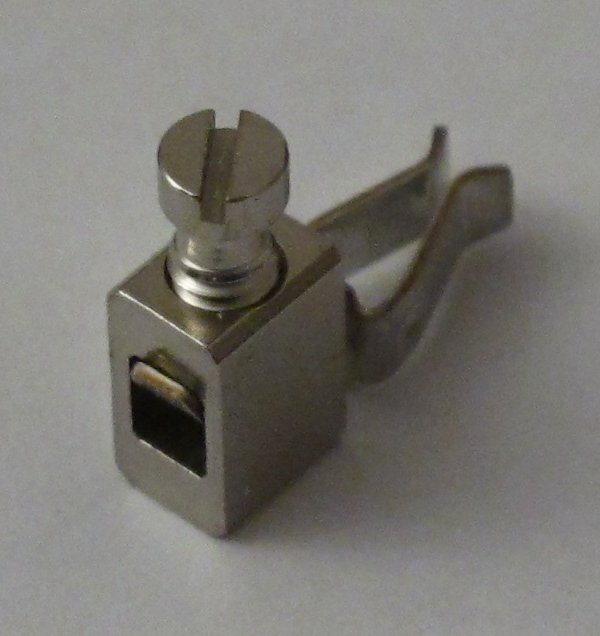
A fixed or barrier strip mounts directly to a panel or chassis. Raised barriers separate positions. They do not prove a voltage rating, touch safety, or weather protection.
Where did “multi-level” and “multi-conductor” go? They remain important construction descriptions, but they can sit inside several families. A sensor/actuator block may be multi-level; a feed-through block may offer several conductors at the same potential. Use the circuit diagram instead of counting openings or levels.
This table is a routing tool, not a rating table. It deliberately avoids generic amperage, voltage, conductor, and torque values because those belong to the exact product and stated test conditions.
| Family | What it adds | Good first-use case | Main question before ordering |
|---|---|---|---|
| Feed-through | One continuous electrical path | Panel-to-field power, control, or signal wiring | Does the conductor/rating/accessory set match the circuit? |
| Protective earth | An approved PE connection path | Protective-conductor terminal rows | Is the exact block and rail assembly evaluated for PE? |
| Fuse | A holder for a specified fuse link | Protected branch or control circuits | Does the fuse system match fault level, power loss, and duty? |
| Disconnect / test | A planned opening or test point | Commissioning and service work | What may be operated, under which electrical state? |
| Distribution | One input routed to several outputs | Common supply or return potentials | How are current and conductor sizes assigned to each path? |
| Sensor / actuator | Compact signal and supply grouping | PLC I/O and field-device wiring | Does the internal diagram match the device and I/O scheme? |
| DIN-rail modular | A modular support and accessory system | Control panels and switchgear | Is the full strip BOM compatible with the rail and enclosure? |
| Fixed PCB | A permanent wire-to-board interface | Controllers, drives, and power electronics | Do footprint, process, spacing, and ratings fit the PCB? |
| Pluggable PCB | A separable plug/header interface | Prewired or replaceable modules | Are mating, coding, locking, cycles, and operating state defined? |
| Fixed / barrier | Direct panel mounting and pole separation | Equipment and chassis wiring | Do the mounting pattern, cover, hardware, and conductor fit? |
Decision rule: if two products have the same family name but different circuit diagrams, conductor instructions, ratings, or certificates, treat them as different candidates. A catalogue label is never enough for release to production.
After the circuit function and physical interface are clear, compare how each candidate holds the conductor. There is no universal winner. The right choice depends on the approved conductor, production method, tool control, inspection plan, vibration and temperature conditions, service access, accessory range, and target-market evidence.
Compare exact product series under the same circuit and conductor requirements. Marketing speed claims are not a substitute for a timed trial with your real wire preparation, labels, tools, and quality checks.
| Decision point | Screw / clamping yoke | Tension spring / spring cage | Push-in spring |
|---|---|---|---|
| Normal hand action | Insert the prepared conductor and tighten as instructed. | Open the spring with the approved tool or lever, insert, then release. | Insert a suitable conductor directly; operate the release for other accepted conductor forms. |
| Production control | Manage tool condition, stated torque where applicable, and final inspection. | Manage strip length, full insertion, actuator/tool use, and inspection. | Manage conductor preparation, full insertion, release use, and inspection. |
| Conductor question | Which solid, stranded, ferruled, or lugged conductors and combinations are approved? | Which conductor classes and preparations can the spring accept? | Which conductors insert directly, and which require an actuator or ferrule? |
| Service question | What tightening and maintenance instructions apply after a conductor is changed? | How is the spring opened without damaging the block or conductor? | Where is the release point, and how is correct reinsertion checked? |
| Do not assume | A universal torque, re-tightening interval, or conductor range. | That every spring terminal is tool-free or approved for every vibration level. | That every stranded conductor can be pushed in bare or that every design is the same. |
The mounting or interface choice sets a large part of the mechanical design. A DIN-rail strip needs rail space, end parts, wire ducts, bend space, and a complete accessory list. A fixed barrier strip needs an approved mounting pattern, screw hardware, and any required cover. A PCB terminal needs a board footprint and a compatible manufacturing process.
Fixed PCB and pluggable PCB parts solve different service problems. A fixed terminal stays on the board and accepts the field wire directly. A pluggable system separates into a wired plug and board header. The second option may simplify module replacement, but it adds mating, coding, locking, and insertion-cycle questions.

These products are not interchangeable with a plain disconnect or feed-through block. Add them to the shortlist only when the circuit function, accessories, and operating procedure call for them.
Provide a defined neutral link or disconnect point in a system designed for that arrangement. Confirm local equipment rules, link operation, marking, ratings, and whether the product may be opened under the intended state.
Support measurement and test circuits through a specified switching or shorting sequence. A current-transformer secondary must not be left open while primary current flows. Use only the exact make-before-break or shorting system and procedure approved for the circuit.
Add an electronic component or indication function inside the terminal level. Confirm the circuit diagram, component value, voltage, polarity, power loss, replacement method, and failure behavior.
Use compatible conductor and terminal materials to preserve a thermocouple measurement path. Confirm thermocouple type, polarity, alloy, temperature transition, connector system, and instrumentation instructions.
These words describe geometry and connection count. Read the internal diagram to learn which points share a potential and which remain separate. Do not infer commoning from appearance.
These are relative family labels, not universal thresholds. Compare actual dimensions, conductor system, current-temperature data, spacing, mounting, accessories, and short-circuit evidence.
Do not start with a maximum catalogue rating or a favorite connection style. Start with the drawing and end with a complete model and accessory BOM supported by documents for the target equipment and market.
Identify every feed-through, PE, fused, disconnect, distribution, device, or board-interface point.
Use an actual wiring diagram.List AC/DC voltage, current, fault duty, impulse needs, ambient, grouping, and applicable rating system.
Do not mix IEC and UL values.Record copper or aluminum, solid or stranded, AWG or mm², preparation, and conductors per point.
“It fits” is not approval.Check rail or hole pattern, PCB footprint, width, height, bend space, wire direction, enclosure, and environment.
Include accessories and covers.Match the datasheet, drawing, instructions, certificate file, accessory compatibility, samples, and inspection plan.
Control the full BOM revision.Most errors begin when a correct word is used as if it described the whole product. Replace each shortcut with one specific question.
Ask what every rail-mounted block does. A normal feed-through block does not bond to the rail, while an approved PE block may intentionally do so.
Ask which conductor forms insert directly and which need an actuator, ferrule, or another preparation. Follow the stated strip length and release method.
Ask for the exact model’s instructions. Thread size, screw material, body style, clamp, conductor, and lubrication state all affect the required method.
Ask what the contact is evaluated to switch or isolate, and under which state. A terminal disconnect does not automatically replace a safety isolator or load-break device.
Ask which points are internally common. Multi-level and multi-conductor housings can contain separate circuits, shared potentials, PE levels, components, or bridges.
Ask for the exact model and file coverage. IEC is a standards system, CE marking is not a universal third-party approval, and component recognition does not approve the complete panel.
Use the application to decide which type families deserve a closer look. The final model still depends on the circuit and complete equipment conditions.
Start with feed-through, PE, fuse, disconnect, distribution, and device circuits. Then add end parts, bridges, markers, covers, test accessories, rail space, and wire-duct clearance to the BOM.
Components for panel builders →Sensor/actuator, multi-level, distribution, fuse, and disconnect functions can reduce wiring confusion when the internal diagrams, potentials, LEDs, labels, and PLC drawings stay aligned.
Automation and machine control →Choose DIN-rail, fixed, PCB, or pluggable interfaces around the production flow, service concept, footprint, approved conductor set, test plan, accessory kit, packaging, and revision control.
Support for equipment manufacturers →Standards define product scopes and test requirements. They do not give every product the largest current, voltage, or conductor size found in a standard’s scope. They also do not replace the complete panel or equipment evaluation.
For industrial terminal blocks, the exact part of IEC 60947-7 depends on the function. PCB terminal blocks have a separate part. UL 1059 covers terminal-block assemblies within its stated scope, while the exact product file and Conditions of Acceptability define how a recognized component may be used.
The current fourth edition covers specified support-mounted screw-type and screwless terminal blocks for copper conductors, including test-disconnect terminal blocks in Annex D. Its scope limits are not universal product ratings.[6]
View the official IEC scopeProtective-conductor terminal blocks and fuse terminal blocks are addressed in separate parts. This is why a general “IEC terminal block” claim is not enough for a special function.[7][8]
IEC 60947-7-2 · IEC 60947-7-3This part applies to specified PCB terminal blocks for industrial or similar use. Match the exact PCB product, board layout, conductor, ratings, and assembly process instead of treating every PCB connector alike.[9]
View the official IEC scopeUL states that compliance with the terminal-block standard does not by itself assure suitability for every end product. Verify the exact model, ratings, file, installation conditions, and complete equipment evaluation.[10]
View the official UL 1059 scopeSENTOP supports component matching around your panel and project. A clear request connects the electrical function, conductor, mounting, environment, evidence, quantity, and delivery needs to one proposed order number and accessory set.
Use these answers to narrow the category. Use the exact product data, equipment rules, and target-market evidence to approve a model.
Ten useful buying families are feed-through, PE, fuse, disconnect/test, distribution, sensor/actuator, DIN-rail modular, fixed PCB, pluggable PCB, and fixed/barrier. These labels can overlap. One block can combine a function, mounting family, and connection technology.
They are connection technologies. They tell you how the wire is held, not what the circuit does. Feed-through, PE, fuse, DIN-rail, PCB, and other products may use any suitable evaluated technology.
Most panels need a mix: feed-through for ordinary circuits, PE for protective conductors, distribution for shared potentials, fuse or disconnect for selected circuits, and sensor/actuator blocks for field I/O. The drawing and exact product data decide the mix.
DIN-rail blocks form a modular rail-mounted system. Fixed or barrier strips mount directly to a surface. Neither style sets a universal rating or circuit function. Compare the mounting, cover, hardware, conductor, spacing, and exact product data.
A fixed PCB terminal accepts the field wire on the board-mounted part. A pluggable system uses a wired plug and separate header. It adds mating, coding, locking, cycle, and operating-state checks. Do not unplug under load unless the product allows it.
No. A fuse terminal holds a specified fuse for overcurrent protection. A disconnect terminal creates an opening or test point. Some products combine both, but the fuse system, switching duty, accessories, fault level, and procedure still need checking.
Not from the name alone. Suitability depends on the exact terminal, wire, preparation, mounting, accessories, and test profile. Compare product-level evidence with the equipment conditions.
Send the circuit diagram, voltage, current, temperature, fault conditions, wire data, conductors per point, mounting or PCB interface, dimensions, accessories, and environment. Add the target market, required documents, quantity, destination, and any model, photo, drawing, sample, or BOM.
Send the circuit roles, conductor schedule, electrical conditions, mounting, accessories, environment, target market, quantity, destination, and document needs. SENTOP can help organize the next component-matching step.