

You may think socket arrangement is a small part of office decoration, but that is not true. Many people think you can put outlets anywhere and still have a safe and nice workspace. Old ideas often cause messy cables, unsafe setups, and ugly walls. If you plan where sockets go, your space works better and looks good. Take some time to see how your office feels and ask if it could be better.
Key Takeaways
- Good socket arrangement helps people work better. Put outlets close to desks. This saves time and keeps things neat.
- Safety is very important. Keep cables away from paths. Use cable organizers so wires do not pile up.
- Offices today need to be flexible. Floor outlets and built-in sockets help with new layouts and tech.
- Pick the right socket for each spot. Use USB outlets for charging. Use network sockets for computers. This makes work easier.
- Plan where sockets go with care. Draw a map of your office. Think about changes that may happen later. This keeps your space useful and clean.
Why Socket Arrangement Matters
Productivity
Have you ever tried to plug in your laptop and realized the outlet is too far away? You waste time searching for a power source or moving furniture. Good socket arrangement helps you work faster and keeps your focus on the task. When outlets sit close to your desk, you don’t need to stretch cables across the room or get up just to charge your phone.
- You save time because you don’t have to walk around looking for a free outlet.
- You stay organized since cables don’t clutter your workspace.
- You keep your workflow smooth and avoid interruptions.
A smart layout with accessible sockets means you can power up devices quickly. Your team works better when they don’t have to fight over outlets or deal with tangled cords.
Safety
Safety matters in every office. If you ignore socket arrangement, you might end up with cables running across walkways. People can trip and hurt themselves. Overloaded outlets can cause electrical problems. You want to keep your office safe by planning where sockets go. Place outlets near workstations and away from busy paths. This simple step helps prevent accidents and keeps everyone healthy.
Tip: Use cable organizers and avoid plugging too many devices into one outlet. This keeps your office safe and tidy.
Office Design
Socket arrangement affects how your office looks and feels. Outlets in the right spots make your space look clean. You can hide cables and keep walls neat. If you plan well, you can move furniture easily without worrying about power access. A well-designed office feels welcoming and professional. You create a space where people want to work.
Think about socket arrangement when you decorate. It’s not just about power—it’s about making your office work for you.
Sockets on Walls
Modern Needs
Some people think sockets should only go on walls. This idea worked before, but offices are different now. Today, people need more choices. Workers move desks and use many devices. Meeting spaces change a lot too. If you only use wall sockets, you cannot move furniture easily. You also cannot work in every spot you want.
Look at how new office needs are not like old ways:
| Aspect | Modern Office Needs | Traditional Socket Placement Strategies |
|---|---|---|
| Flexibility | Lets people move and change their workspace | Keeps sockets in one place, not easy to reach |
| Ergonomics | Cares about comfort and health | Does not think much about comfort |
| Technology Integration | Needs to connect many tech tools easily | Often does not have enough tech connections |
| Aesthetics | Wants the office to look nice and match | Looks are not as important as just working |
| Collaboration | Makes it easy for people to work together | Hard to share power because sockets do not move |
| Cable Management | Tries to keep cables neat and tidy | Cables get messy because sockets do not move |
| Hybrid Work Environments | Helps people work in different ways | Made for people who always work in the office |
Modern offices need more than just wall sockets. You want to move things around and keep your space open. Good socket arrangement helps you do this.
Floor Outlets
Floor outlets give you more choices. You can put desks anywhere you want. You do not have to worry about reaching a wall. This makes your office look cleaner. You will not see long cords on the floor. This keeps your office safe and neat.
Tip: Floor outlets have covers. These covers keep out dirt and spills. This helps keep the outlets safe.
Here are some good things about floor outlets:
- Convenience: You can move furniture any way you like. You do not need to stretch cords to the wall.
- Safety: Fewer cords mean fewer trips and falls. Covers keep floor outlets clean and safe.
- Aesthetic appeal: Your office looks tidy. Cables are hidden.
But there are some problems too:
- Risk of damage: Floor outlets can get wet or stepped on. You need to clean and check them often.
- Installation costs: Floor outlets cost more to put in. You may need a professional to help.
If you want a modern office, do not just use wall sockets. Try floor outlets or sockets in furniture. Your office will work better and look nicer.
Duplex Receptacles
Continued Relevance
Some people think duplex receptacles are not useful anymore. This is not true. Offices still use duplex receptacles a lot today. You can find them in almost every office. They work well with new technology. They are not replaced by new things. Many duplex receptacles now have USB ports built in. You can charge your phone or tablet without an adapter. Some have covers and child-proof parts for safety. These outlets come in many styles. You can pick one that matches your office.
Note: Duplex receptacles let you change your space. You can choose colors, shapes, and features that you like.
Here are reasons duplex receptacles are important now:
- They work with new technology.
- They have better safety features.
- You can choose styles for your office.
- They are good for homes and offices.
Modern Uses
Duplex receptacles do more than power computers. They help save energy and keep your office safe. You can plug in two things at once. You do not need lots of power strips. Some new ones show how much energy you use. This helps you save power and money. Safety is better now too. GFCIs and AFCIs help stop shocks and fires. You can connect them to solar panels or other green energy.
Here is how duplex receptacles help offices today:
| Aspect | Description |
|---|---|
| Energy Conservation | You can plug in more things without extra cords, so you save energy. |
| Energy Usage Monitoring | Some outlets show your power use, so you can use less. |
| Safety Innovations | New features help keep you safe from electrical problems. |
| Integration with Renewables | You can use them with solar panels for better energy use. |
When you plan where sockets go, remember duplex receptacles. They help keep your office safe and ready for new tech.
All Sockets Are the Same
Types
You might think every socket in your office does the same job. That’s not true. Sockets come in many shapes and sizes, and each one has a special purpose. If you look around your workspace, you’ll see more than just the regular power outlets. You’ll spot sockets for computers, phones, and even network cables.
Here are some common socket types you’ll find in offices today:
- Electrical Sockets: These give power to your devices. You use AC power sockets for things like lamps and printers. DC power sockets work for laptops and some smaller gadgets.
- Computer and Networking Sockets: Ethernet sockets (RJ45) help you connect to the internet with a cable. USB sockets let you charge your phone or transfer files between devices.
- Specialized Sockets: Some computers have PCI or PCIe sockets inside. These let you add new parts to your computer, like a better graphics card.
Tip: If you know what each socket does, you can set up your office so everything works smoothly.
Choosing Right
Picking the right socket for each area makes your office safer and more efficient. You don’t want to plug your computer into a socket that can’t handle the power. You also don’t want to run long cables across the room just to reach a network socket.
Here’s what you should think about when choosing sockets for your office:
- For desks and workstations, use desktop switches with multiple outlets and USB charging ports. These power your computers, monitors, printers, and mobile devices without clutter.
- Meeting rooms need sockets for projectors and charging stations for guests.
- Break areas work best with simple electrical sockets for appliances like coffee makers.
A good socket arrangement means you don’t have to worry about tangled cords or searching for a place to plug in. You create a workspace that feels organized and ready for anything.
Safety Myths
Hazards
You might hear a lot of stories about office sockets and think they are always safe. Some myths can make you ignore real dangers. Let’s clear up a few common ones:
- You may believe low voltage means low risk. That’s not true. Even low voltage circuits can hurt you if the current is high.
- You might think any rubber glove will protect you from shocks. Only special gloves made for electrical work keep you safe.
- You may trust extension cords for everything. If you use them the wrong way, they can overheat and start a fire.
- You might skip inspections because everything seems fine. Hidden problems can cause accidents if you don’t check sockets and cords often.
Remember: Regular inspections help you spot trouble before it gets serious.
Office sockets can cause real hazards if you don’t use them right. Here are some risks you should watch for:
- Overloaded sockets can get hot and start a fire if you plug in too many devices.
- Water near sockets or wet hands can lead to electric shocks.
- Sockets without proper grounding can make electricity dangerous, especially if wires are faulty.
If you know these risks, you can keep your workspace safer.
Safe Practices
You can avoid most socket problems by following a few simple rules. Here’s what you should do:
- Always unplug cords by holding the plug, not the cord. This keeps the cord from breaking.
- Don’t press or stretch cords under furniture or rugs. Cords need space to stay safe.
- Check cords and plugs for damage before you use them.
- Never overload outlets. Plugging in too many high-power devices can cause overheating.
- Use only one extension cord at a time. Don’t connect two together.
- Keep cords away from places where people walk. This stops trips and falls.
- Use equipment that is earthed or double-insulated.
- Switch off appliances when you’re not using them.
Tip: Replace frayed or damaged cords right away. A small fix can prevent a big problem.
If you follow these safe practices, you help protect yourself and everyone in your office. Safety starts with you!
Socket Arrangement and Office Layout
Planning Tips
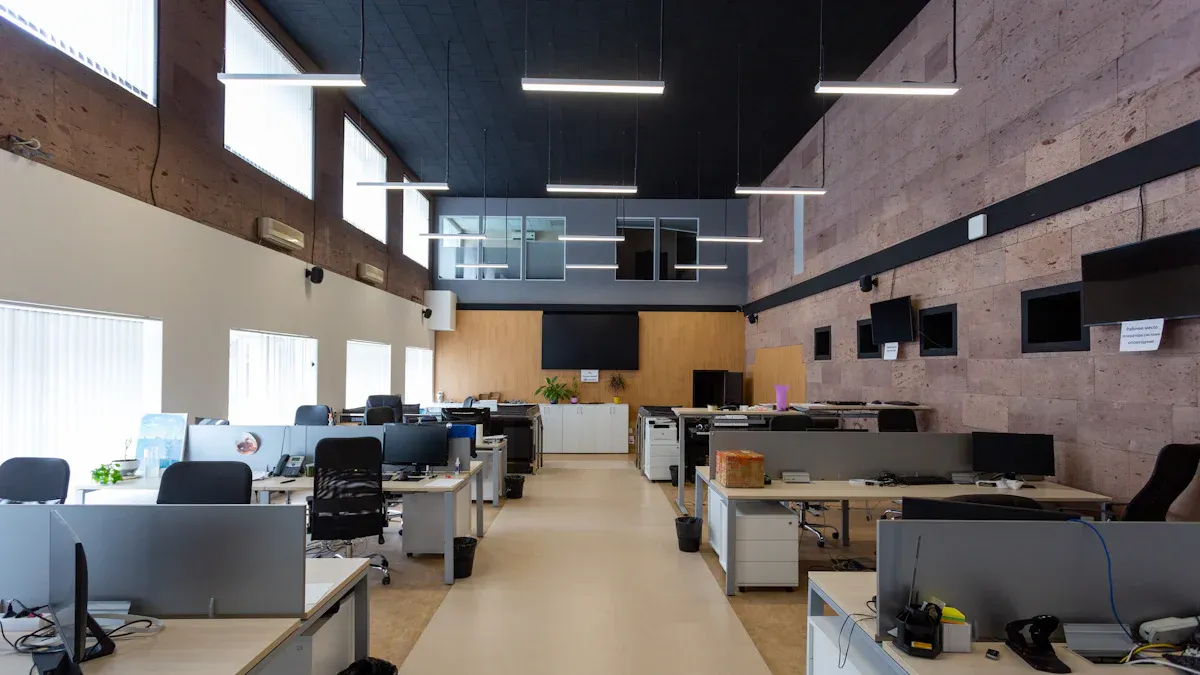
Have you ever tried to move your desk and found outlets in the wrong place? Bad socket arrangement can make your office feel small and messy. You might see cables on the floor or furniture blocking power. This slows you down and makes your workspace look cluttered.
You can fix these problems if you plan ahead. Here are some tips to help you start:
- Map Out Your Space
Draw a simple map of your office. Mark where you want desks, chairs, and tables. Think about where people will walk and work. - Place Sockets Near Work Areas
Put outlets close to computers, printers, and other devices. You will not need long cords or extra power strips. - Keep Walkways Clear
Make sure cables do not cross where people walk. This keeps everyone safe and stops trips and falls. - Plan for Future Changes
Offices change over time. You might add new desks or move furniture. Pick socket spots that work now and later. - Use Different Types of Outlets
Add USB outlets for charging phones and tablets. Use network sockets for computers. Pick outlets that fit your needs.
Tip: Ask your team what devices they use most. This helps you decide where to put sockets.
Room-Specific Needs
Each room in your office has its own needs. You cannot use the same plan for every space. Let’s see how socket needs change from room to room.
| Room Type | Socket Requirement |
|---|---|
| Private Offices | At least 50% of receptacles must be controlled. |
| Conference Rooms | Controlled receptacles required for energy management. |
| Break Rooms | Controlled receptacles necessary due to regular occupancy. |
| Workstations | Similar requirements as private offices, with controlled receptacles to manage energy consumption. |
| Rooms larger than 200 sq ft | Must have controlled receptacles within 72 inches of uncontrolled ones. |
You will find controlled receptacles in many places, like:
- Private offices
- Open office areas
- Break rooms
- Huddle or conference rooms
- Classrooms
Controlled receptacles help you save energy. You can turn off power when you do not need it. This keeps your office safe and lowers your bills.
When you plan socket arrangement, think about each room. A conference room needs outlets for projectors and laptops. Workstations need power for computers and monitors. Break rooms need sockets for coffee makers and microwaves. If you match outlets to each space, your office works better and feels more organized.
Note: Check your office layout every year. You might find new ways to make your socket setup better.
Aesthetics
Integrated Design
You want your office to look sharp and feel organized. Sockets can help with that if you use smart design strategies. You do not have to settle for plain outlets that stick out. You can match them to your style and keep your space tidy.
Here are some ways you can blend sockets into your office design:
- Match the Aesthetic: Pick outlets that go with your desk’s material. If you have wood, metal, or glass, you can find sockets that fit right in.
- Minimalist Design: Choose outlets with clean lines and neutral colors. These blend in and do not distract from your workspace.
- Custom Covers: Some desks let you use covers that show off your brand or personal style. You can make your office feel unique.
- Hidden Solutions: Try desks with sliding panels or retractable outlets. You can hide sockets when you do not need them.
When you use these ideas, your office looks neat. You do not see messy cables or power strips everywhere. You get a workspace that feels modern and helps you stay focused. Integrated design solutions also give you features like wireless charging and easy access to power. Your team feels happier and more productive because everything works smoothly.
Tip: A tidy office with smart socket placement makes a great first impression on visitors and clients.
Concealed Solutions
You might want to hide sockets but still reach them easily. You have many options that keep your office looking clean without losing function. Check out these popular methods:
| Method | Description |
|---|---|
| Pop-up Sockets | Hidden below the surface until you need them. Great for desks and meeting tables. |
| Under-Cabinet Outlets | Tucked under cabinets so you do not see them, but they are easy to reach. |
| Built-in Charging Pads | Let you charge devices without cords showing. |
| Drawer Outlets | Keep devices plugged in and out of sight inside drawers. |
| Appliance Garages | Store appliances behind a door, keeping counters clear. |
| Inside Cabinets | Outlets inside cabinets keep things tidy and easy to access. |
| Creative Cover Plates | Decorative covers blend with your design and add style. |
You can pick the solution that fits your office best. Concealed sockets help you keep your space safe and stylish. You do not have to worry about tangled cords or clutter. Your office stays ready for work and looks great every day.
Note: Concealed solutions work well in shared spaces and meeting rooms. You get power when you need it, but your office stays neat and professional.
Future-Proofing
Technology Upgrades
Offices get new technology all the time. People use laptops, tablets, and smartboards every day. You need to keep up with these changes to work well. Old socket setups do not fit what offices need now. You want power and network connections close to your desk. You do not want to stretch cords or search for a place to charge your phone.
Offices are not just for desks and chairs anymore. Workers use many devices like laptops, phones, and tablets. All these need power and network connections that work all the time. Outlets on walls do not always fit new office designs. Open-plan offices and flexible workstations need sockets in better places.
You can see new socket designs everywhere. Some desks have power outlets built in. Meeting rooms use smartboards and projectors, so sockets must be close by. Portable charging stations help you work anywhere. You do not have to worry about losing power during meetings.
Flexibility
You want your office to change when you need it. Sometimes you move desks or add new workstations. You do not want to feel stuck because sockets are only on the walls. Flexible socket setups help you arrange your space any way you want.
- Floor outlets let you move furniture and change layouts fast.
- You can add power, data, and communication ports to floor socket boxes. This helps you get ready for new technology.
- Mobile charging stations make it easy to work in different spots.
- Desks with built-in power help you adjust your workspace for comfort.
You can future-proof your office by planning for change. You do not have to redo everything when you upgrade your tech. Your workspace stays ready for new devices and new ways of working. You save time, stay organized, and keep your team happy.
You now know that smart socket arrangement helps your office stay safe. It also makes your space flexible and look nice. Try activity-based seating to help teams work together. Modular setups let people meet quickly and easily. Desk booking systems and smart sensors help you use space well. Look at the table below for more ideas:
| Strategy | Benefits |
|---|---|
| Activity-based seating | Helps people focus and work together |
| Neighborhood concept | Builds team spirit and helps people talk |
| Rotational seating | Shares ideas and helps teams work better |
Look around your office. You can change things or ask an expert for help. Your workspace will feel new and ready for anything.
FAQ
How many sockets do you need in a small office?
You should plan for at least two outlets per workstation. Add extra sockets for shared spaces like meeting rooms and break areas. Ask your team what devices they use most to help decide.
Can you install sockets by yourself?
You should not install sockets on your own. Call a licensed electrician for safety. They know how to follow local codes and prevent electrical hazards.
What is the best way to hide cables?
Try using cable organizers, desk grommets, or furniture with built-in channels. These tools keep cords neat and out of sight. Your office looks cleaner and feels safer.
Do USB outlets replace regular sockets?
USB outlets help you charge phones and tablets. You still need regular sockets for computers, printers, and other big devices. Use both types for a flexible workspace.
See also
What Applications Require Type A or Type B RCBOs in 2025
What is the Right Socket for Your Home, 15 Ampere or 20 Ampere
How to Identify the Most Suitable Wall Socket for Your Space
What You Need to Know About Outdoor Socket Safety
What Is the Maximum Number of Appliances a Socket Can Handle
