
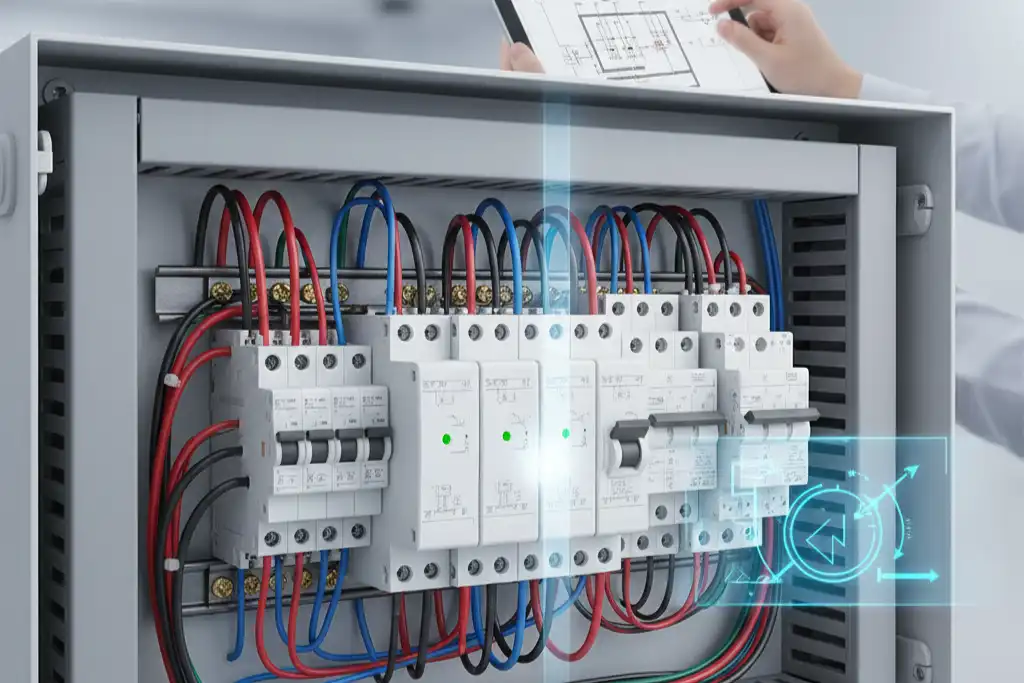
You should put your SPD very close to the main busbar in the distribution box. This helps keep the wires short and makes protection work well. If you put the SPD too far away or use long wires, it will not work as well. The right setup keeps electronics safe, stops fire dangers, and protects your system.
| Risk Type | Description |
|---|---|
| Exposure of Sensitive Electronics | Wrong layout can let power surges hurt sensitive electronics, causing them to break early. |
| Ineffective Surge Protection | Bad SPD placement or wiring can make surge protection not work. |
| Fire Hazards | Using the wrong circuit breakers and cables can cause big fire risks from overloads. |
Surge protection is very important now because new buildings have more sensitive electronics and need power all the time.
Key Takeaways
- Put SPDs near the main busbar. This keeps wires short. Short wires help protect devices better. Devices work better with short wires.
- Use Type 2 SPDs in most home boxes. Put them after the main breaker. This helps stop surges well.
- Test your SPDs every six months. Check for warning signs like burned connectors. This helps you find problems early.
- Follow the National Electrical Code when installing SPDs. This keeps things safe. It also follows building rules.
- Use more than one SPD for stronger protection. Many SPDs help guard your building from surges.
SPD Layout Essentials
Key Principles
There are some important rules for arranging surge protection devices. These rules help keep your electrical system safe. The table below lists the main things to remember:
| Principle | Description |
|---|---|
| First-level SPD | The first-level SPD should protect your equipment from high voltages. If it cannot, add a second-level SPD with at least 5kA discharge current. |
| Distance Between SPDs | Keep 10 meters or more between voltage switching SPD and voltage limiting SPD. Keep 5 meters or more between two voltage limiting SPDs. |
| Protection for Long Distances | If the SPD is more than 30 meters from your equipment, put another SPD near the equipment. This SPD should have 8kA current capacity. |
| Power Frequency Overvoltage | Pick SPDs that can handle power frequency overvoltage. This kind of overvoltage is stronger than short surges. |
| Breaking Capacity | Each SPD level needs protection. Make sure the breaking capacity is higher than the biggest short-circuit current. |
| Selection Factors | Think about response time, service life, cost, maintainability, flow capacity, and humidity resistance when choosing an SPD. |
Tip: Always check the space between your SPDs. Good spacing helps each device work better and keeps your system safe.
Immediate Steps
Follow these steps to set up surge protection devices in a new building:
- Put a Type 2 SPD at the distribution switchboard. This device protects your system from leftover surges and switching spikes.
- Place a Type 3 SPD close to sensitive equipment. This step gives extra protection to computers and servers.
- Make sure your SPD reacts fast to stop overvoltage. Quick response keeps your electronics safe.
- Choose a device with strong surge absorption. It should handle surge amplitudes below 10 kV.
- Lower insertion loss. This keeps your signal transmission clear and strong.
Here is where to put each SPD type:
- Type 1: Put this at the main entrance of the building. It works best where lightning can hit directly.
- Type 2: Place this after the main breaker. It fits well in commercial and industrial systems.
- Type 3: Install this close to the equipment. It is good for IT rooms and panels with sensitive devices.
Note: Always use SPDs that meet standards like UL 1449 and UL 508A. These standards make sure your devices are safe and reliable.
Pick SPDs with high surge power and long life for big buildings. Put SPDs at the main entrance, distribution panels, and near important equipment. This setup gives your building strong protection against surges.
Distribution Box and Surge Protection Overview
Distribution Box Role
The distribution box helps organize your building’s electrical circuits. It is the main place where power gets sent to different areas. The box keeps your system safe with circuit breakers and other devices.
- The distribution box usually has main surge protection. This uses T1-type test devices to handle strong impulse currents.
- When lightning hits power lines, these devices let out extra energy. This keeps your electrical equipment safe.
- Surge protection boxes are placed at important spots in your system. They help lower the effects of surges from lightning or other causes.
- These boxes protect your equipment from overvoltage. Overvoltage can cause a lot of damage.
- You can find surge protection boxes in places like communication centers, power stations, and transportation hubs. They help protect main power sources from surge events.
Surge Protection Importance
Surge protection is needed to keep your building’s electrical system safe and working well. Surges can happen anytime and cause big problems if you do not have the right protection.
- Surge protection devices keep electronics safe from harm. This helps you avoid paying for repairs or new equipment.
- These devices also protect important data. You lower the chance of losing information or stopping business work.
- Surge protection lowers the risk of electrical fires. This makes your home or business safer.
- By stopping surge damage, your equipment can last longer.
- Many building codes now say you must have surge protection. This keeps your building safe and lowers risks for your business.
- When you use surge protection, your business can keep running. You avoid losing money and keep your customers happy.
Tip: Always look at your distribution box to check for good surge protection. Good protection keeps your building safe and your equipment working.
Surge Types and Sources
Common Sources
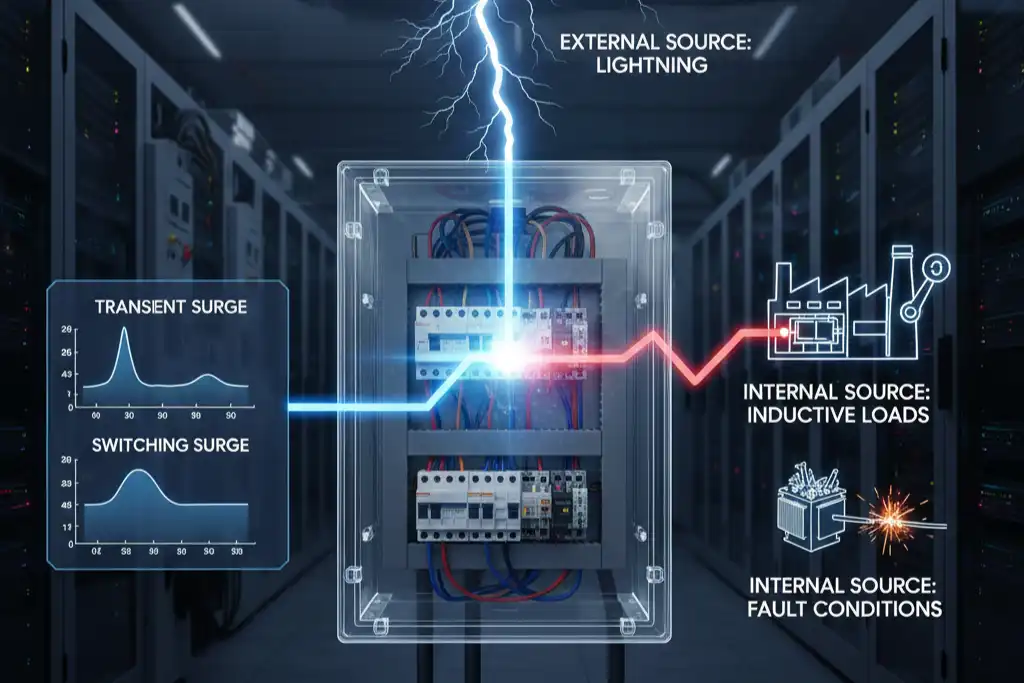
There are many kinds of surges in your building. Surges can come from inside or outside the system. Some surges happen fast, while others build up slowly. If you know where surges start, you can protect your equipment and keep your building safe.
Here are the main sources of electrical surges:
| Source of Surge | Description |
|---|---|
| Lightning | Lightning strikes can send a huge charge through power lines. This can cause surges. |
| Damaged Utility Lines | Broken utility lines can mess up the flow of electricity. This can make surges happen. |
| Power Restoration After Outages | When power comes back after an outage, it can cause uneven surges. These surges can overload circuits. |
| Internal Surges from Electronics | Devices like HVAC systems can make small surges when they turn on or off. |
| Faulty Wiring | Old or broken wiring can make the electrical system unstable. This can lead to surges. |
| High Demand for Electricity | When too much electricity is used, the system can get overloaded. This can cause voltage spikes. |
Note: Electrical problems cause about 6.3% of fires in non-residential buildings each year. Old wiring is a big reason for these fires.
System Impact
Surges can hurt your building’s electrical system in many ways. Small surges may not be easy to see, but they can add up and cause big trouble later.
- Power surges can slowly damage appliances and wires, even if you do not notice right away.
- Sensitive electronics like computers can break early from many small surges.
- Surges can make your devices work worse and not last as long.
- Voltage spikes can make wires and devices too hot, which can start fires.
- Surges can damage wires and cause short circuits or other dangers.
- HVAC systems and other big machines can get damaged fast or over time if surges are too strong.
- Burned connectors and broken control boards can happen from many electrical shocks.
Tip: Check your system for signs of surge damage, like flickering lights, devices that stop working often, or burned connectors. Fixing problems early can stop bigger issues.
SPD Integration Steps
Load Assessment
Start by checking how much power your building uses. Look at every device and machine that connects to your distribution box. Write down the total power used in each area. This helps you know how strong your surge protection should be.
- Count all circuits and see which ones power sensitive equipment.
- Check if your building has big machines, HVAC systems, or IT rooms.
- Find out if your area has lots of lightning or unstable power.
- Measure the short-circuit current for each panel. This tells you what kind of protection you need.
Tip: Always think about the future. If you want to add more equipment, make sure your surge protection can handle it.
SPD Selection
Once you know your load, you can pick the right surge protection device for your distribution box. Match the device to your building’s needs and follow safety rules. Use the table below to help you choose:
| Criteria | Description |
|---|---|
| Types of SPDs | Learn about Type 1, Type 2, and Type 3 devices. Each type fits a different spot in your system. |
| Risk Assessment | Think about lightning risk and where your building is. Check the main switchboard for entry points. |
| Protection of SPDs | Make sure your device has protection from overheating and short-circuits. Use circuit breakers if needed. |
| Recommended Type | For most distribution boxes, use a Type 2 device with a discharge capacity above 5kA (8/20). |
| Circuit Breaker Selection | Pick a breaker that matches your building’s short-circuit current. For homes, 6kA is common. |
The National Electrical Code (NEC) 2023 says you must install surge protection in all homes, dorms, hotels, and nursing homes. You need to put the device at the service entrance or right next to it. You can use either Type 1 or Type 2 devices. For safety circuits, always install surge protection with or next to the control panel.
Note: Always check your panel size before buying a device. Measure the space and make sure the device fits without blocking other equipment.
Placement and Wiring
Put your surge protection device in the best spot for it to work well. Good placement and wiring keep your system safe and help the device last longer.
- Place the device as close as you can to the main busbar or breaker. Short wires are best.
- Use thick, straight wires to connect the device. Do not use loops or sharp bends.
- Ground the device the right way. A good ground keeps your system safe and stops radio problems.
- If you have DC power or Ethernet cables, put surge protection on both ends.
- Protect both positive and negative lines to ground for DC systems.
- Use standalone devices that fail safely. This keeps other equipment safe if the device stops working.
- Pick devices that can handle many surges without wearing out. Look for ones with silicon avalanche suppression diode circuits.
For big buildings, use a layered setup. Put one device at the main switchboard, another at distribution panels, and a third near sensitive equipment. The table below shows how to set up cascaded protection:
| Stage | Location | Rating | Purpose |
|---|---|---|---|
| Stage 1 | Main switchboard or service entrance | 250 kA per phase, hybrid | Stops big lightning surges, protects main wiring |
| Stage 2 | Distribution panels for key equipment | 120 kA per phase, hybrid | Blocks leftover surges and inside spikes |
| Stage 3 | Circuits for sensitive equipment | 60-80 kA per phase, series | Protects devices that cannot handle small surges |
Tip: Always plan your surge protection early. Place devices close to power supplies or drivers to keep wires short and safe.
Check that your device matches your panel layout. Measure the space and make sure you follow all code rules. This keeps your system safe and helps you avoid problems later.
SPD Selection Criteria
Performance Ratings
When you pick a surge protection device, check some key ratings. These ratings tell you how well the device protects your system. Use the table below to compare the most important ratings:
| Performance Rating | Description |
|---|---|
| Voltage Protection Rating (VPR) | Shows how well the device stops a surge. Lower numbers mean better safety for your equipment. |
| Surge Current Rating | Tells you the biggest surge the device can handle. Higher ratings give stronger protection. |
| Short Circuit Current Rating (SCCR) | Says if the device works safely during short circuits on AC power. |
| Nominal Discharge Current (Inominal) | Shows the current levels the device was tested with. This helps you know if it fits your system. |
Check these ratings before you buy anything. A lower voltage protection rating keeps electronics safer. A higher surge current rating means the device can handle bigger surges. Match the short circuit rating to your panel’s needs. If you choose a device with the right ratings, you protect your building and keep things working.
Tip: Pick devices with easy-to-read labels and test results. This helps you compare and choose the best one for your needs.
Compatibility
Make sure your surge protection device works with your building’s electrical system. Good compatibility helps you avoid problems and keeps protection strong.
- Match the device with backup generators and circuit breakers. This stops overloads and keeps your system steady.
- Have a certified technician check if the new device fits with old panels.
- Pick the right size so you do not risk overloads.
- Test all protective devices after you install them. Make sure AFCI and GFCI test buttons and surge protector lights work.
- Keep records of installation and test results for future checks.
- Match the device’s features with circuit breakers and fuses. This stops nuisance tripping and helps everything work together.
If you follow these steps, your SPD will fit your system and give you the best protection.
Common Mistakes
Placement Errors
You can make several mistakes when you install surge protection devices. These errors can lower the safety of your building and put your equipment at risk.
- You might install a Type 2 SPD without checking if it matches your breakers.
- You may use wires that are too thin. Thin wires slow down the SPD and make it less effective.
- Placing SPDs too far from the equipment you want to protect can reduce their ability to stop surges.
- Sometimes, you forget to check the voltage suppression rating. If the rating is wrong, your SPD will not protect your devices.
Tip: Always keep SPDs close to the main busbar and use the right wire size. Double-check ratings before you finish the installation.
Wiring Issues
Bad wiring can cause surge protection devices to fail or work poorly. You need to pay attention to how you connect and ground your SPDs. The table below shows common wiring problems and what they mean:
| Wiring Issue | Description |
|---|---|
| Sustained overvoltages | Overvoltages can make SPDs conduct all the time. This wears them out and makes them less safe. |
| Excessive surge currents | Big surges, like those from lightning, can break SPDs if the rating is too low. |
| Improper bonding and grounding | If you do not ground your SPD well, it cannot protect your system. This can lead to device failure. |
| Inadequate SPD sizing and installation | If you pick the wrong size or install it wrong, the SPD cannot stop surges as it should. |
Note: Always use thick, straight wires and make sure your ground connections are strong.
Maintenance Oversights
You need to check your surge protection devices often. If you forget, your system can become unsafe.
- You might miss signs that your SPD is wearing out, like warning lights or burned connectors.
- Dust and dirt can build up inside the distribution box. This can block airflow and make devices overheat.
- You may skip routine tests. If you do not test your SPD, you will not know if it still works.
🛠️ Regular checks and cleaning help your surge protection last longer and keep your building safe.
Best Practices
Code Compliance
You must follow rules when you put SPDs in your building’s distribution box. These rules help keep your system safe and working well. Here are some steps you should follow:
- Make sure each SPD is the right size and grounded well. This stops damage and helps the device work right.
- Put SPDs close to the equipment you want to protect. Use short, straight cables to make them work better.
- Follow the National Electrical Code. Use Article 285 for installing and Article 250 for grounding. These rules help you avoid mistakes.
- Get a licensed electrician to install and ground your SPDs. Professionals know how to follow the rules and keep things safe.
- Check your building’s grounding. Make sure all outlets have the right polarity and impedance below 1 ohm.
- Use the right wire size and make sure connections are tight. This helps your SPD fight electrical noise and sudden changes.
- Pick SPDs that are UL Listed. Use Type 1 or Type 2. Type 1 SPDs are flexible and have strong fault current tests.
- Keep SPD lead wires short. Always follow what the manufacturer says.
🛡️ Tip: Ask an engineer who knows surge suppression to design your system. This helps you get better safety and performance.
Routine Testing
You need to check and take care of your SPDs often. Testing helps you find problems early and keeps your building safe. Many people forget this, but it is very important.
| Challenge | Description |
|---|---|
| Improper Installation | Long wires and bad grounding can make SPDs not work. |
| Inadequate Grounding and Bonding | Bad grounding stops SPDs from working. |
| Not Using Multi-Layered Protection | Using only one SPD leaves your system open to surges. |
| Not Monitoring and Maintaining SPDs | If you do not check SPDs, you may miss problems and leave your system unsafe. |
Test SPDs after you install them and during regular checks. Look for warning lights, burned connectors, or signs of damage. Clean the distribution box to stop dust from building up. If you see problems, fix or replace the SPD right away.
🔍 Note: Training classes like “Fundamentals of Surge Protection” give certificates and education credits. These help professionals learn the best ways to protect buildings.
You can keep your building safe by following important steps for SPD layout. Always ground your surge protection device first. Make sure all connections are tight. Keep your devices dry and clean. Check them often. Replace them every few years. Regular maintenance helps you find problems early. This can help you avoid expensive repairs.
| Benefit | Description |
|---|---|
| Longer equipment life | Devices last longer when you use surge protection. |
| Less downtime | You can stop sudden shutdowns and keep things working. |
| Lower repair costs | You spend less money fixing broken equipment. |
If your setup is complicated, ask a licensed electrician or follow trusted standards.
FAQ
How close should you install an SPD to the main busbar?
You should install the SPD as close as possible to the main busbar. Short wires help the device work faster and protect your equipment better.
What type of SPD fits most home distribution boxes?
Type 2 SPDs work best for most homes. You can install them after the main breaker to protect your circuits from leftover surges.
How often should you test your SPD?
You should test your SPD every six months. Look for warning lights or signs of damage. Regular checks help you catch problems early.
Can you use one SPD for the whole building?
You should use more than one SPD for strong protection. Place SPDs at the main entrance, distribution panels, and near sensitive equipment.
See also
Type 1 vs Type 2 vs Type 3 Surge Protective Devices Explained
How does SPD deal with strong surge voltage?
Engineers’ Guide to Installing Surge Protection for Industrial Safety
The reasons for SPD failure and how to detect damage
Surge protection device for solar panels stops lightning damage fast
