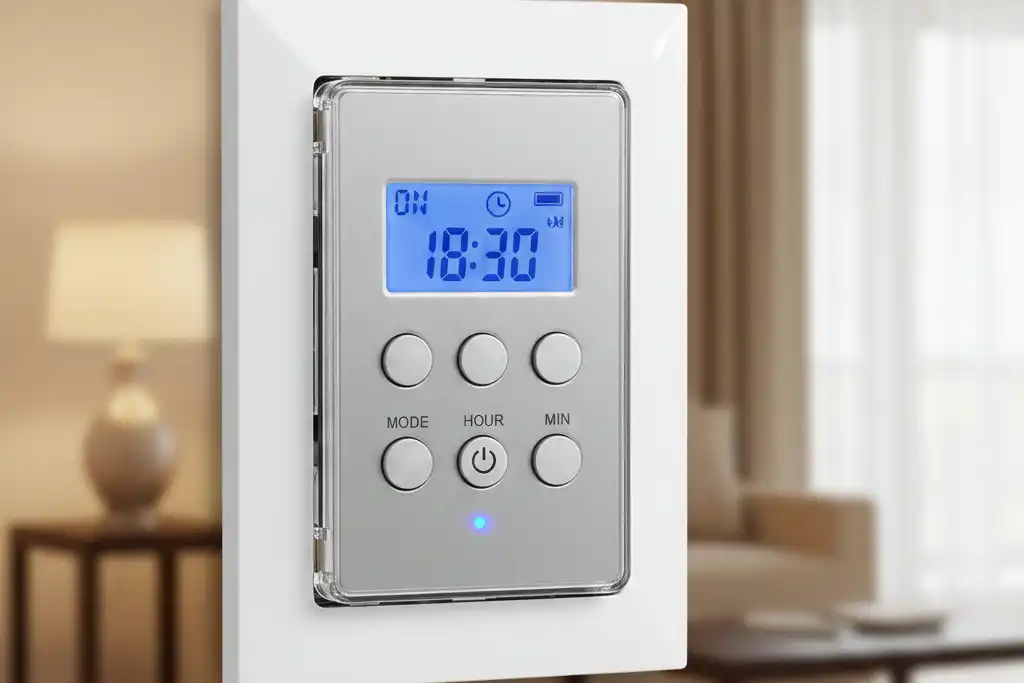
Timer switches help you choose when lights and appliances turn on or off. You make a schedule, and the device does the work for you. Almost 40% of homes in the U.S. use timer switches now. People use them to save energy, mostly for lights and HVAC systems. Timer switches give you many benefits:
- You pay less for energy each month.
- You get more comfort with automatic schedules.
- You make your home safer by keeping lights on when needed.
- You can use them with smart home systems.
Key Takeaways
- Timer switches help lights and appliances turn on or off by themselves. This saves you time and energy. Using timer switches can help lower your energy bills. They make sure devices only work when you need them. Timer switches also help keep your home safe. They keep lights on when you are not home. This makes it look like someone is there. Pick the right timer switch for your needs. Mechanical timer switches are simple and last a long time. Digital timer switches are more exact and have more features. It is important to install timer switches the right way. Always turn off the power first and follow the directions.
Timer Switches Overview
Definition And Function
Timer switches help you decide when things turn on or off. You can set a time for lights, fans, or other devices. People use timer switches at home, at work, and in factories. These switches make daily tasks easier. They also help make places more comfortable.
Timer switches do many jobs in different places. Here is a table that shows how people use them:
| Function | Description |
|---|---|
| Lighting Control | Turns lights on and off for safety and comfort. |
| Appliance Management | Runs appliances on a schedule to save energy. |
| Office Lighting | Controls office lights to save power. |
| HVAC Systems | Helps control heating and cooling systems. |
| Machinery Control | Starts and stops machines in factories. |
| Process Automation | Makes factory work easier by running tasks automatically. |
You can see timer switches help with many things. They save you time and make life simpler.
How Timer Switches Work
Timer switches use simple or advanced parts to control power. You pick a time for the switch to turn something on or off. Some timer switches have dials you turn. Others have screens and buttons. You can set them for every day or every week.
When you set a timer switch, it follows your plan. The switch sends power to your device at the right time. It stops power when the time is up. You do not have to remember to turn things off. The timer switch does this for you.
Tip: Timer switches can turn off lights when you leave. This helps you save energy and money.
Benefits
Timer switches give you many good things at home or work. You get more control over your devices. You also save energy and money. Here is a table that shows the main benefits:
| Benefit | Description |
|---|---|
| Energy savings | Turns off devices when not needed to save energy. |
| Optimized usage | Gives you better control of lights, heat, and air. |
| Cost savings | Saves you money by using less energy. |
You can also enjoy these things:
- Set devices to use less energy.
- Program timer switches to turn off lights and heat in empty rooms.
- Pay less for energy and help the planet.
Timer switches make life easier. You get comfort, safety, and savings with easy-to-use technology.
Types Of Timer Switches
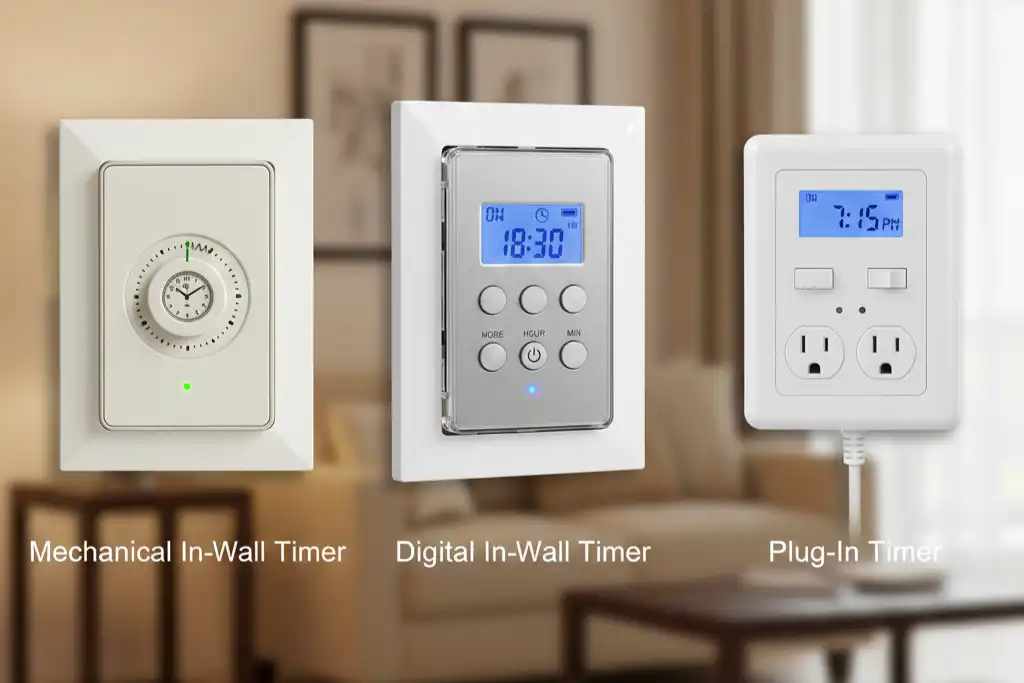
There are different timer switches. Each type works in its own way. Choosing the right one helps you control your lights and devices.
Mechanical Timer Switches
Mechanical timer switches use gears and springs to keep time. You set the time by turning a dial. These switches are good for simple jobs, like turning lights on and off every day. Offices use them for HVAC, lighting, and security systems. They do not need batteries or electricity to keep time. This means they use very little energy. Mechanical timer switches are strong and last a long time. You might need to change the settings by hand.
| Feature | Digital Timer | Mechanical Timer (Analog) |
|---|---|---|
| Operation | Uses digital circuits with a display | Relies on mechanical components |
| Programming Duration | Supports multiple timing periods | Usually max 24 hours |
| Applications | Used in precise applications | Suitable for simple, low-precision tasks |
| User Interface | Clear display with buttons | Manual dials for setting |
| Accuracy | Highly accurate | Limited accuracy |
| Energy Consumption | Requires power source or battery | Low energy consumption |
| Design | Smaller, elegant designs | Larger, more durable |
| Lifespan | Longer lifespan | May wear out over time |
| Cost | Generally more expensive | More economical |
Digital Timer Switches
Digital timer switches use electronic parts and a screen. You set them with buttons. You can program many on and off times. These switches are more accurate. You can set different times for each day. Digital timer switches are smaller and look modern. They need a battery or power to work. You can use them for jobs that need exact timing, like watering gardens or running appliances.
Astronomic Timer Switches
Astronomic timer switches use your location to know sunrise and sunset. You do not need to change them for daylight changes. These switches can:
- Set on and off times using sunrise and sunset.
- Save many settings and change for daylight savings time.
- Give you better control of outdoor lights.
- Help save energy by matching lights to sunlight.
You get better lighting control without using light sensors.
Photocell Timer Switches
Photocell timer switches use sensors to see changes in light. When it gets dark, the sensor turns on your lights. When the sun comes up, the lights turn off. The sensor checks light levels and tells the switch what to do. You can change how sensitive the sensor is. Photocell timer switches are good for outdoor lights. They keep your home bright at night and save energy during the day.
Working Principles
Mechanical Operation
Mechanical timer switches use gears, springs, and a small motor to keep time. When you set the dial, the AC synchronous motor starts to turn the gears at a steady speed. This movement pushes the dial clockwise. The ratchet mechanism clicks as it moves, and the microswitch turns your device on or off at the right moment.
You should always turn the knob clockwise. This keeps the gears working smoothly. If you need to change the time during a cycle, gently move the knob forward. After the timer finishes, return the knob to zero. This helps the spring last longer and keeps the timer accurate.
Here is a quick guide for using mechanical timer switches:
| Key Operational Steps | Description |
|---|---|
| Direction-Sensitive Setting | Turn the knob clockwise to set the time. |
| Power Coordination | Make sure the main power switch is on after setting the timer. |
| In-Process Adjustment | Move the knob forward if you need to change the time. |
| Post-Cycle Reset | Set the knob back to zero after use. |
Tip: Listen for a clicking sound. This means the gears are working right.
Digital Operation
Digital timer switches use electronic circuits and a small screen. You set the schedule with buttons. The timer stores your settings in memory, so you do not lose them if the power goes out. You can program up to eight on and off times for each week. This gives you more control over your devices.
| Feature | Description |
|---|---|
| Programmable ON/OFF Cycles | Set up to eight different schedules for the week. |
| Battery Backup | Keeps your settings safe during power outages. |
| User-Friendly Interface | Simple buttons and a screen make it easy to set exact times. |
You can pick the exact day and time for each device. This makes digital timer switches great for busy homes and offices.
Astronomic And Photocell Operation
Astronomic timer switches use your location to track sunrise and sunset. You do not need to adjust them for daylight changes. These switches use sensor technology and sometimes connect to the internet. Some even use artificial intelligence to improve accuracy and save energy.
- Sensor technology helps the timer know when the sun rises or sets.
- IoT features let you control the timer from your phone.
- AI-driven automation adjusts schedules for you.
Photocell timer switches use a light sensor. When it gets dark, the sensor turns on your lights. When the sun comes up, the sensor turns them off. You can trust these timers to keep your home bright and safe without extra effort.
Timer Switch Applications

Lighting Control
Timer switches help you control lights at home or work. You can set times for lights to turn on or off. This keeps rooms bright when you need them. It also saves energy when you do not need light. Many people use timer switches for porch lights. The lights turn on at sunset and off at sunrise. You can also make lights turn on when you are away. This makes your home look like someone is there and keeps it safer.
Note: Timer switches can make it look like you are home. This helps keep burglars away and makes your house safer when you travel.
Water Pumps And HVAC
Timer switches help water pumps and HVAC systems work better. You can set pumps to run at certain times. This saves you time and energy. Here are some ways timer switches help:
- Set water pumps for gardens and irrigation.
- Control pool pumps to keep water clean.
- Manage well pumps for better water supply.
- Program pumps to turn on and off for good energy use.
Water pump controllers also help with speed, pressure, and flow. This makes pumps last longer and lowers costs. In businesses, matching pump speed to what is needed saves energy.
Fans And Heaters
Timer switches help you control fans and heaters at home. You do not have to remember to turn them on or off. You can set fans to run during hot afternoons. Heaters can warm rooms before you wake up. Many people pay less for energy after using timer switches.
- Set fans and heaters for daily use.
- Schedule things like coffee makers for easy mornings.
- Plan your day without extra work.
| Benefit | Description |
|---|---|
| Energy Savings | Saves money by stopping devices from running too long. You can save up to 15%. |
| Safety | Stops appliances from getting too hot. This makes homes safer. |
| Convenience | Makes tasks easier. You can heat your home or turn on lights without doing it yourself. |
Tip: You can use less energy by setting a schedule. This makes your home safer and more comfortable.
Mechanical Vs. Digital Comparison
Function And Accuracy
Timer switches help you control when things turn on or off. Mechanical timer switches use gears and springs inside. You set the time by turning a dial. Digital timer switches use electronic parts. You set the schedule with buttons and a screen.
Accuracy is important if you want things to work on time. Mechanical timers can be off by a few minutes. Digital timers are much more exact. They are only off by a few seconds each day. You can see the difference in this table:
| Timer Type | Accuracy | Lifespan |
|---|---|---|
| Mechanical Timer | ±2-5 minutes | 15-20 years |
| Digital Timer | ±2 seconds/day | 8-12 years |
Pick a digital timer switch if you need perfect timing. Pick a mechanical timer if you want it to last longer.
Cost And Features
You might want to know how much timer switches cost. Mechanical timer switches usually cost less money. Digital timer switches cost more but have extra features. Here is a price comparison:
| Type | Price Range |
|---|---|
| Basic Mechanical Timers | $12 – $35 |
| Digital Programmable | $25 – $75 |
Mechanical timers are simple and easy to use. They only turn things on and off. Digital timers let you set many schedules. You can pick different days and times. Some digital timers have battery backup and memory. You get more choices, but you pay more.
Pros And Cons
You should look at the good and bad sides before you choose a timer switch. Here is a quick list for mechanical timer switches:
Pros:
- Easy to use
- Works well in tough places
- No need to know programming
- Usually costs less
- Simple to fix
Cons:
- Not many features
- Not as exact
- Parts can wear out
- Can be big
Tip: Use a mechanical timer switch for outside or rough places. Use a digital timer if you want more control and better timing.
Smart Home Integration & Installation
Smart Home Compatibility
Timer switches can work with smart home systems. You can control lights and appliances from your phone or by talking to a voice assistant. Some timer switches use WiFi, Zigbee, or Z-Wave to connect to your smart home hub. Make sure your timer switch works with your system before you buy it.
You might have some problems when setting up timer switches with smart home platforms. Devices may not use the same way to talk to each other. This can make things not work right. If your WiFi is weak, your timer switch may lose its connection. Some timer switches use more power than you think. This can make them not work as well.
Tip: Always read the manual and check if your timer switch works with your smart home system before you install it.
Installation Tips
You can put in timer switches by following easy steps. First, look at all the wires and make sure they are neat. Check that no wires are broken or showing metal. Always turn off the power before you start. Make sure your timer switch matches the contactor ratings. Look at the manual for help with the terminals and voltage.
After you finish the wiring, turn on the timer switch and test it. This helps you know if it works. If you are not sure about something, ask an electrician for help.
Here are some mistakes people make and how to fix them:
| Common Mistakes | Description | Solution |
|---|---|---|
| Incorrect Wiring | Wires in the wrong place can cause problems. | Check every wire before turning on the power. |
| Faulty Switches | Old switches may blink or stop working. | Get new switches and make sure they fit your system. |
| Battery Issues | The wrong battery can make the switch not work. | Use the right battery and change it when needed. |
| Poor Connections | Loose wires can stop the switch from working. | Make sure all wires are tight and safe. |
Note: Always test your timer switch after you install it. This makes sure it works the way you want.
Safety Precautions
You should always be safe when putting in timer switches. Turn off the power at the breaker box before you start. Use a voltage tester to make sure no wires have power. Be careful with all wires and cover them well. If you do not know how to work with wires, call an electrician.
Wear safety goggles to keep your eyes safe from sparks or dust. Keep a first aid kit close in case you get hurt.
- Turn off the power at the breaker box.
- Use a voltage tester to check the wires.
- Be careful with wires and cover them well.
- Ask an electrician for help if you are not sure.
- Wear safety goggles.
- Keep a first aid kit nearby.
Safety first! Take your time with electrical work. Being careful keeps you and your home safe.
Timer switches help you use less energy and save money. They also make your home safer. You can use timer switches for lights, fans, or heating. They work in smart homes and regular homes. Picking the right timer switch is important. Look at this table to see the differences:
| Factor | Mechanical Timer Switch | Digital Timer Switch |
|---|---|---|
| Accuracy | Less accurate | Very accurate |
| Durability | Good for tough places | Best for indoor use |
| Cost | More affordable | Higher cost, more features |
Using less electricity helps the planet and cuts down on pollution. Make sure you install your timer switch the right way for the best results.
FAQ
How do you set a timer switch?
You set a timer switch by following the instructions in the manual. Use the dial or buttons to choose the time. Make sure you check the display or dial to confirm your settings.
Can you use timer switches outdoors?
You can use timer switches outdoors if they have a weatherproof design. Look for switches labeled for outdoor use. These switches resist rain and dust. Always check the product details before installing outside.
Do timer switches save you money?
Timer switches help you save money by turning off devices when you do not need them. You use less electricity. Your energy bill goes down. Many people see savings after a few months.
What devices work with timer switches?
You can use timer switches with lights, fans, heaters, water pumps, and small appliances. Check the switch rating to match your device. Most timer switches work with common household electronics.
Are timer switches safe to install yourself?
You can install timer switches if you follow safety steps. Turn off the power first. Use a voltage tester. If you feel unsure, ask an electrician for help. Safety always comes first.
See also
What breaker size do well pumps typically need
How to Quickly Estimate Custom Electrical Control Panel Costs
How to Install an Air Circuit Breaker in Simple Steps
How to Calculate Circuit Breaker Tripping Time Accurately with Trip Curves